The server is part of the destination
Kuro's official PS5 FAQ states that progress is separate between servers. For linked accounts on the same server, progress can sync across supported platforms. It also says the PS5 server is determined by the PSN account region.
That distinction explains why changing devices and changing servers are different actions. If you recognise your login but see a different character or progression, do not proceed with a recharge until you know which account and server the current session is using.
Record the UID and server together from the game you intend to use. A saved UID without server context leaves a compatibility question unresolved. A nickname or character screenshot helps recognition but should not replace the destination fields required by the exact package.
Find the registered PSN country before choosing a server
Sony’s account settings show the country or region registered to the PSN account. It is not determined by where the console is currently located, the language you choose or the currency you select at checkout.
Sign in to PlayStation Account Management. Open Your Information, then choose Edit beside Residential Address. Read the country or region shown at the bottom. Do this on Sony’s own site; Veegame does not need your PSN password or a screenshot of your home address.
Sony says an account’s country or region cannot be changed after creation. When the published mapping conflicts with the server you intend to use, investigate the account link through Kuro’s official process before buying. Selecting another payment currency does not resolve that conflict.
Section references: Sony: check your PlayStation account country or region · Kuro Games official Wuthering Waves PS5 FAQ
The complete published PSN country-to-server mapping
The table reproduces all 70 country and region entries in Kuro’s published PS5 FAQ, grouped by its five server labels. It maps the registered PSN account region to a game server; it is not a Veegame supply-coverage table.
The checker above uses the same source data. Hongkong is displayed as Hong Kong, the United States as United States, and Great Britain as United Kingdom (Great Britain). These display labels do not add countries to the official list. If your account region is absent, consult Kuro’s official support rather than guessing from geography.
| Server in Kuro’s PS5 FAQ | Registered PSN countries / regions |
|---|---|
| Asia Server | Japan, Korea |
| America Server | Argentina, Bolivia, Brazil, Canada, Chile, Colombia, Costa Rica, Ecuador, El Salvador, Guatemala, Honduras, Mexico, Nicaragua, Panama, Paraguay, Peru, United States, Uruguay |
| Europe Server | Austria, Bahrain, Belgium, Bulgaria, Croatia, Cyprus, Czech Republic, Denmark, Finland, France, Germany, Greece, Hungary, Iceland, Ireland, Israel, Italy, Kuwait, Lebanon, Luxembourg, Malta, Netherlands, Norway, Oman, Poland, Portugal, Qatar, Romania, Russia, Saudi Arabia, Slovakia, Slovenia, South Africa, Spain, Sweden, Switzerland, Turkey, Ukraine, United Arab Emirates, United Kingdom (Great Britain) |
| SEA Server | Australia, New Zealand, India, Indonesia, Malaysia, Singapore, Thailand |
| HMT Server | Hong Kong, Macau, Taiwan |
Section references: Kuro Games official Wuthering Waves PS5 FAQ · Official FAQ data served by Kuro Games
Check linking and merchant coverage separately
Account linking determines which game account you access across platforms. Merchant coverage determines whether a particular offer can be fulfilled for that destination. Solving one does not establish the other.
For your account check, compare the character, UID and server you actually use on each device. If the PS5 session differs, use Kuro's official linking guidance and support. Do not submit a top-up for a destination you have not identified merely to see where it arrives.
Kuro’s FAQ gives an in-game route to review account linking: open Settings, then Account Settings, then User Center. Check the linked Kuro and PSN accounts there. Its PS5 guidance says players using Google or Facebook login need to bind a Kuro Games account email before syncing progress on PS5. Follow the official instructions for your existing account rather than starting a new game account to test a recharge.
For the product check, read the exact package name and supported platforms or servers. The order may be for Lunites, a Lunite Subscription or another item. A product with one fulfillment method does not prove that every Wuthering Waves item is available through the same method.
Public Kuro guidance cannot certify the server coverage of a Veegame pack. The Veegame offer needs its own clear destination requirements. A currency selector or a list of payment methods does not supply that evidence.
Section references: Kuro Games official Wuthering Waves PS5 FAQ
A destination worksheet to complete before checkout
Keep this worksheet beside the final order summary. It is designed to catch contradictions between the current game session and the submitted destination, without collecting your account login.
If you are buying for someone else, have them confirm the destination from the current game session. You do not need their PSN password, email password or one-time login code to compare the UID and server they intend to recharge.
- Current game session: the intended character and progression.
- Destination: UID and server copied together.
- PlayStation context, if relevant: PSN region and the account actually linked.
- Purchased item: exact pack or subscription name.
- Product requirements: stated platform and server coverage.
- Final order: submitted destination, amount, currency and reference.
What to do when the records do not agree
If the PSN mapping and intended server do not agree, stop the purchase and investigate account linking through Kuro's official process. This is an account issue, not a reason to falsify a checkout region.
If the merchant's server labels differ from the game labels, ask for an explicit correspondence. Do not select the closest-sounding option. A similar-looking label is not enough to confirm the destination.
If the product does not state platform support, use a channel whose compatibility you can verify. A low price does not compensate for an unidentified destination.
Keep destination evidence with the purchase
Save the accepted order summary and a private record of the intended UID and server. After delivery, inspect that same destination. If you switch platforms, confirm that you are viewing the linked account and server you recorded.
If an item is missing, report the item name, order reference, submitted destination and observation time. An image of a different server's balance cannot establish the outcome on the ordered destination.
The companion Lunites-and-subscription guide explains why the expected item and delivery schedule also matter. Confirm both destination and product before interpreting a balance change.
Destination checks and bonus eligibility answer different questions. Use the Lunite bonus comparison to read the selected base-plus-extra amount without assuming a first-purchase benefit from a different channel.
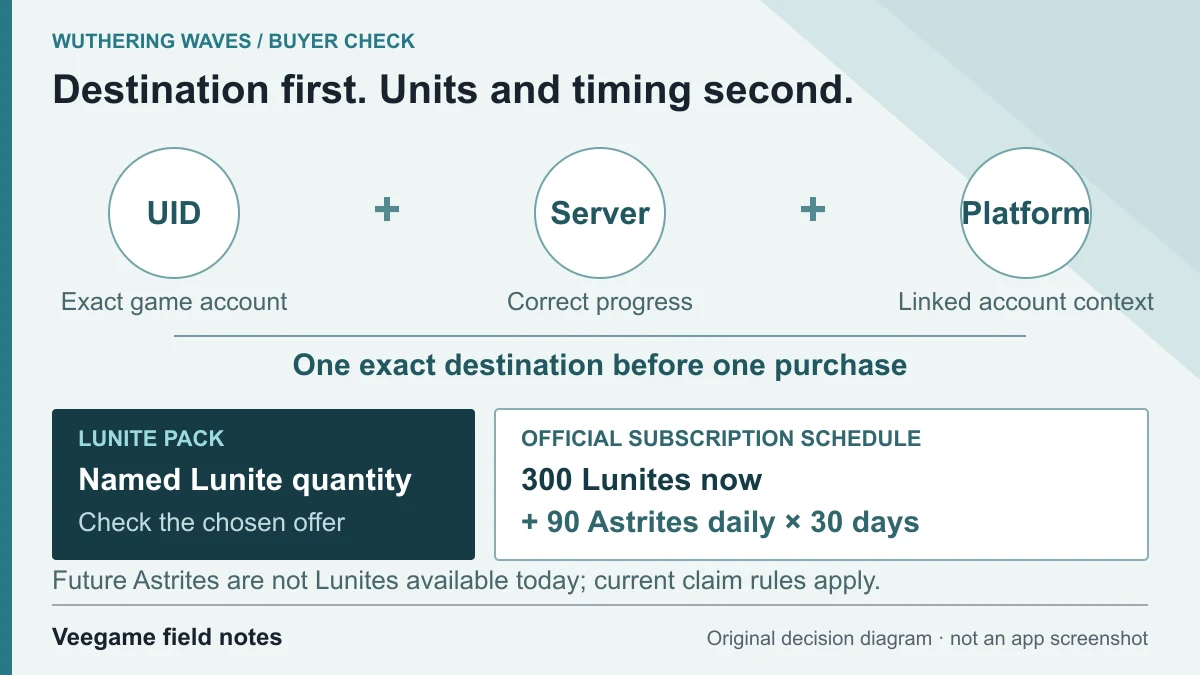
Original Veegame field notes · Primary reference. This is a decision diagram, not an app screenshot.
Sources and scope
The PSN mapping and account-linking steps come from Kuro’s published PS5 FAQ; registered-country lookup comes from Sony’s support instructions. The original checker compares those two account records without collecting credentials. Neither a matching server label nor this worksheet verifies the linked account or a merchant’s pack coverage.
- Kuro Games official Wuthering Waves PS5 FAQ
- Official FAQ data served by Kuro Games
- PlayStation official Wuthering Waves listing
- Sony: check your PlayStation account country or region
Editorial sourcing and correction-contact information are explained in our editorial approach.