Trace the transaction across three systems
Create three columns in a note: payment, merchant order and game account. Copy the exact state and timestamp from each source. This is an original investigation framework, not a record of a tested Veegame transaction.
The payment column explains what your provider says happened to the money. The order column explains what the merchant says happened to the purchase. The game column records what you can see on the intended account.
When the columns disagree, identify the specific disagreement. “My bank shows a charge but the order says unpaid” is different from “the merchant reports delivery, but this account's UC balance has not changed”.
| Column | Save | Question for the responsible party |
|---|---|---|
| Payment | State, amount, currency, reference and time | Was this payment confirmed and linked to the order? |
| Merchant order | Order reference, package, Player ID and shown state | What recipient and fulfillment event are recorded? |
| Game account | Installed edition, intended Player ID, UC observation and time | Am I viewing the ordered destination and expected item? |
Confirm the destination before interpreting the balance
Check the Player ID in the original order against the current account. If you use more than one login or installed edition, confirm which one you are viewing. A familiar nickname does not settle that question.
Midasbuy's official FAQ states that its UC purchases are credited to the in-game account. It separately describes pass-pack delivery. Use that distinction to check whether your actual order promised UC, a pass item or something else; do not assume every purchase increases the UC number.
If you spent UC after the purchase, add that activity to the timeline. A lower current balance alone cannot show that nothing arrived. If you lack a before-purchase balance record, state that limitation instead of inventing an exact starting amount.
Read the payment state literally
Keep the provider's wording. If a transaction is shown as pending, contact the provider or merchant for the meaning of that state. An apparent debit and a settled payment can require different investigation; this guide does not assign a universal meaning to every payment screen.
Preserve the relevant provider reference and the merchant order reference. They may be different. Support can use both to connect a payment attempt to an order instead of searching by approximate amount.
If the payment record shows a reversal or refund, retain it with the original charge. Do not report only the charge and omit a later event. A complete timeline lets support explain the present state.
Ask for the fulfillment record, not a generic reassurance
If the order shows processing, ask which stage remains outstanding and refer to that order's stated delivery terms. If it shows completed, ask whether that state means payment or fulfillment complete and request confirmation of the submitted Player ID.
Record the package's base UC and separately stated bonus conditions. If the disputed amount is a bonus, describe it as a bonus eligibility question rather than saying the whole order is absent.
Official-channel promotions and support timing do not automatically apply to Veegame. Use the terms of the exact order you accepted. This article does not claim a tested delivery time or a publisher-authorized Veegame supply chain.
Section references: Midasbuy official FAQ — UC and pass-pack delivery
Send a focused support message
Use this original template: “Order [reference] was for [exact item and quantity], Player ID [identifier], app edition [name/store link]. It was placed at [date, time and time zone]. My payment provider shows [state], amount [amount and currency], reference [provider reference]. The merchant order shows [state]. At [time], the intended account showed [UC amount or relevant item state]. Please check payment matching, the submitted destination and the delivery record.”
Attach the redacted order summary, relevant payment evidence and a labeled game observation. Include what you have already tried, and keep the response under the same case reference.
For an order placed with Midasbuy, its official Help Center is the relevant merchant support entry. For a Veegame order, use the support route attached to that order. The publisher's account support and a merchant's payment investigation may hold different records.
Keep the investigation to the original order
Do not create another UC purchase just to test whether delivery works. A second order adds another reference and can result in two valid charges or deliveries. Save the first record and ask for its outcome.
Do not send passwords, login verification codes or full card numbers in a routine receipt bundle. Redact unrelated banking activity. Share the intended Player ID through a verified support channel when it is needed to identify the transaction.
If the account later receives UC, add the observation time to the case. If the issue becomes a later removal of previously delivered UC, preserve that separate event and any official notice rather than treating it as the same missing-delivery claim.
For the quantity you expected, use the UC package arithmetic guide to distinguish the base amount from the named bonus. Keep that full label with the original order rather than importing another seller's campaign promise.
Section references: PUBG MOBILE official unauthorized-purchase notice
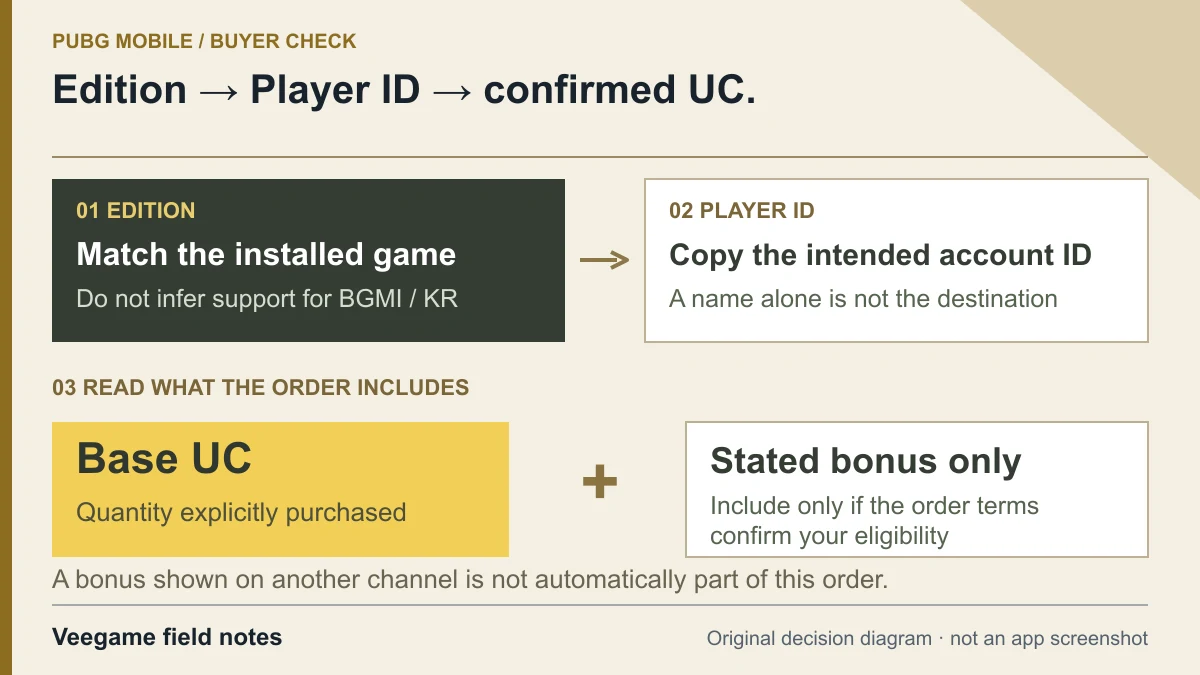
Original Veegame field notes · Primary reference. This is a decision diagram, not an app screenshot.
Sources and scope
The three-record investigation is our method for separating payment, merchant fulfillment and game balance. Midasbuy’s FAQ describes its own delivery flow; its support process is not a Veegame service guarantee.
- Midasbuy official FAQ — UC and pass-pack delivery
- Midasbuy official Help Center
- PUBG MOBILE official unauthorized-purchase notice
Editorial sourcing and correction-contact information are explained in our editorial approach.