Start with the installed app, not the search term
“PUBG UC” is an abbreviated search phrase, not a complete compatibility description. Record the app name, developer or publisher, and store page for the version you actually play. Keep the Player ID alongside that record.
KRAFTON's official materials identify BATTLEGROUNDS MOBILE INDIA as a separately named game created for India. A generic PUBG MOBILE UC listing cannot establish support for BGMI merely because the games share familiar branding.
Regional purchase rules can also differ within the PUBG MOBILE name. The Japanese official site's January 2026 Midasbuy announcement describes account-linking and age conditions for that channel. Do not transplant those conditions or promotions into another market or merchant.
Section references: PUBG MOBILE Japan official Midasbuy announcement · KRAFTON official announcement of BATTLEGROUNDS MOBILE INDIA
Make a simple game identity card
Use the card below before asking whether a particular product is compatible. It is more precise than describing your account as “global” because you travel or pay with an international card.
If your app was installed from a regional store or publisher page, retain that exact link. The language used in the game and the country you are currently visiting do not identify the edition on their own.
| Field | What to record | Why it helps |
|---|---|---|
| Installed app | Complete displayed name | Avoids conflating similarly branded games |
| Publisher and store | Developer or publisher and original store URL | Identifies the actual app listing |
| Player ID | Identifier from the intended current account | Connects the purchase to a destination |
| Regional context | Account or channel conditions stated in official guidance | Identifies compatibility requirements |
| Merchant product | Exact UC listing and supported edition wording | Shows what this offer promises |
What the official Midasbuy guide establishes
Midasbuy's official FAQ describes selecting a country or region, choosing PUBG MOBILE and checking player information such as nickname and Player ID. It says UC purchases are credited to the game account.
This is a useful reference for identifying an account-credit product. It does not prove that every reseller supports all countries, all locally published editions or every Midasbuy promotion.
A returned player name can be an additional check, but it is not enough to erase a product-edition mismatch. A form accepting an ID tells you something about that form; the product still needs explicit compatible conditions.
Section references: Midasbuy official FAQ — PUBG MOBILE account checks and UC · PUBG MOBILE Japan official Midasbuy announcement
Look for an explicit supported edition
Read the seller's product name, description and restrictions together. If they use “global”, look for an explanation of what that means and what is excluded. If they name a particular edition, compare it with your identity card.
Ask a precise question if the offer is unclear: “Does package [reference] support the app at [store URL] for Player ID [identifier] under these account conditions?” The answer should concern the product's coverage, not just whether your preferred payment method is accepted.
Do not infer compatibility from a USD, MYR, SGD or EUR selector. A currency sets the quoted charge. It does not change the app you installed, the account you play or the supplier's ability to fulfill the UC package.
The Veegame PUBG MOBILE page should be reviewed for the current purchase conditions. This guide does not establish Veegame support for BGMI, Japanese channels or every regional edition.
Confirm that the order is UC
After edition compatibility, check the actual purchased item. A UC balance recharge, a redeemable code and a specific pass bundle can have different fulfillment steps. A familiar in-game image is not enough to identify the inclusion.
Separate base UC from any conditional bonus. A promotion visible on an official channel is specific to its terms and should not be counted in a merchant order unless that order documents it.
Save the exact quantity and conditions from the final summary. If you buy for a particular in-game purchase, check its current price in your own account rather than assuming a historical pass price.
Compatibility is only one part of choosing a channel
PUBG MOBILE's official unauthorized-purchase notice warns of account and purchase risks from unverified services. A merchant's ability to accept a Player ID does not establish publisher authorization.
Reach official purchase references from the publisher's own site, and evaluate any merchant claim against evidence for that specific channel. Do not treat a logo, a low price or an unrelated partner badge as proof.
If the edition or channel is unresolved, use a purchase route whose support you can verify before paying. That is easier than trying to correct an incompatible completed order.
Once the edition and channel are resolved, the UC base-and-bonus worksheet adds the selected package's stated amount, subtracts your existing balance and shows the leftover beyond your plan.
Section references: PUBG MOBILE official notice regarding unauthorized purchase services
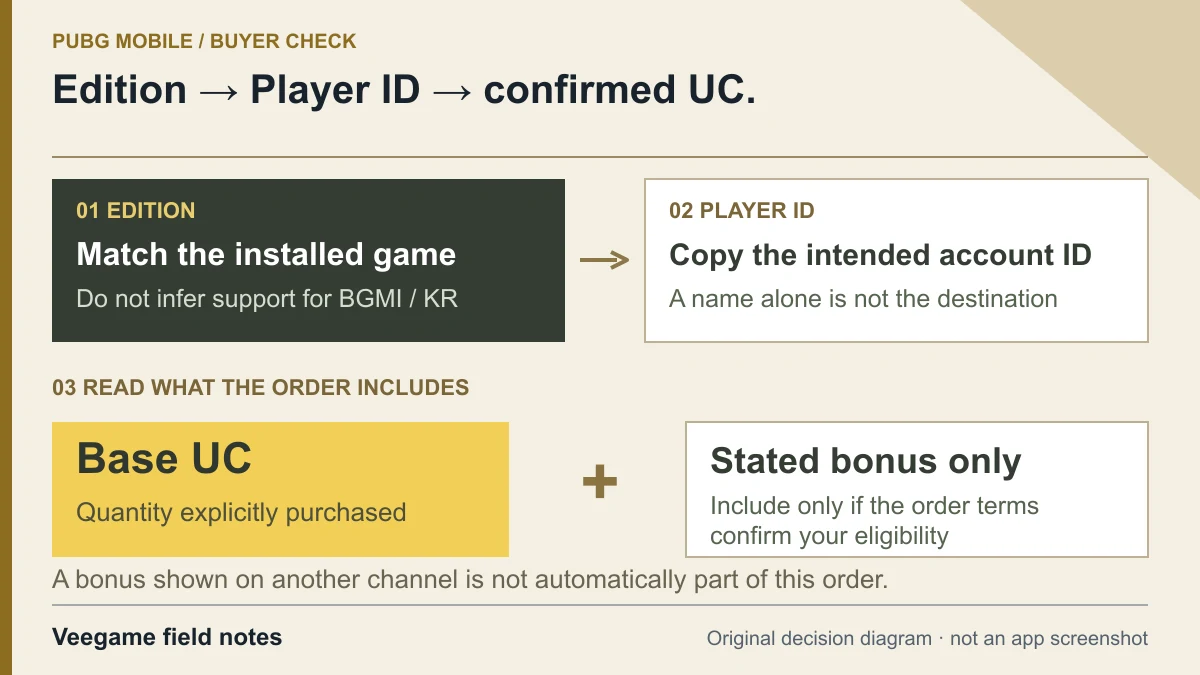
Original Veegame field notes · Primary reference. This is a decision diagram, not an app screenshot.
Sources and scope
Midasbuy, PUBG MOBILE Japan and KRAFTON identify channel and edition differences. These references do not certify Veegame as an authorized seller or establish universal compatibility for a Player ID.
- Midasbuy official FAQ — PUBG MOBILE account checks and UC
- PUBG MOBILE Japan official Midasbuy announcement
- KRAFTON official announcement of BATTLEGROUNDS MOBILE INDIA
- PUBG MOBILE official notice regarding unauthorized purchase services
Editorial sourcing and correction-contact information are explained in our editorial approach.