First identify the stage that is unresolved
A recharge involves more than one system. Your payment provider records money movement, the merchant records the order, and BIGO records the account balance. A success screen in one system is evidence about that stage, not an answer about all three.
Look at the original merchant order before refreshing your bank app repeatedly. Copy the state exactly as shown and record the time you read it. If the merchant says “completed”, ask whether that means payment complete or delivery complete; do not invent a meaning for a label you have not been given.
Check the intended BIGO account separately. If you are viewing a different account or have spent Diamonds after the order, say so. These facts change how a current balance should be interpreted and are worth resolving before you submit a case.
| Evidence | Question to resolve | Useful next check |
|---|---|---|
| Payment provider record | Was the payment confirmed, pending or reversed? | Provider reference, state, amount and currency |
| Merchant order | Was that payment matched and that order fulfilled? | Order reference, submitted BIGO ID and delivery record |
| BIGO account | What balance was visible on the intended account? | Labeled balance and observation time |
Use BIGO's requested fields as a starting point
BIGO's official support page requests the recipient BIGO ID, amount and currency, transaction time with time zone, recharge channel, order reference, receipt and balance or error evidence. It also advises against repeating payment while the original transaction is being reviewed.
Keep these fields in one note. They are useful for identifying a transaction even when your purchase was made through a merchant. The relevant merchant still needs its own order reference to investigate its payment and fulfillment systems.
BIGO's support page describes its own channels and guidance. Its timing statements do not become a Veegame delivery promise. Use the time and escalation conditions stated on your actual order, and describe elapsed time precisely.
Section references: BIGO LIVE Support Center — recharge and payment evidence
Submit and track the report in BIGO LIVE
BIGO’s official support center gives the following route for account or wallet problems. Use it when you need BIGO to review the app-side evidence; the merchant still needs to investigate its own order and payment matching.
Keep your report brief and attach only records relevant to the intended BIGO ID. After submitting, keep the case reference and check My Feedback before opening another report about the same transaction.
- Open Me, then Help & Feedback. Review the relevant help answers; if the issue remains, open Feedback.
- For a recharge issue, choose Recharge/Withdraw.
- Enter your contact email and describe the issue within 1,000 characters. Include the relevant order reference and observation time.
- You can attach up to three screenshots; each must be smaller than 5 MB. Redact passwords, full card numbers and unrelated personal details.
- Tap Submit, then return to Help & Feedback and open My Feedback to review the request.
Section references: BIGO LIVE Support Center — recharge and payment evidence
Create an evidence bundle with a readable timeline
Name each attachment by what it shows: order summary, payment confirmation, balance observation or error. Include the product quantity in the note so support does not have to guess from a price alone. Different packages and currencies can produce similar totals.
Use a time zone beside every time. If one source has no time zone, identify the device or service it came from and note the uncertainty. Keep the original timestamp rather than editing a screenshot to make times appear consistent.
If you have no before-purchase screenshot, say that clearly. A screenshot taken after the problem is still useful; it just cannot independently prove the starting balance. Record any gift spending or other recharge orders between the purchase and your observation.
- Merchant order reference and exact package.
- Intended BIGO ID and the identifier recorded in the order.
- Payment state, amount, currency and provider reference.
- Purchase and observation times with time zones.
- Redacted receipt, balance screenshot and any error text.
A message that asks for a concrete investigation
Use this original template: “I purchased [quantity] Diamonds for BIGO ID [identifier], merchant order [reference], at [date, time and time zone]. The payment record shows [state], [amount and currency], reference [provider reference]. The merchant order currently shows [status]. At [observation time], the intended BIGO account showed [balance]. Please check payment matching, the submitted recipient and the delivery timestamp. I have attached the relevant records.”
If the merchant has already confirmed a delivery destination, include that reply and the case reference. Ask which record is still needed. Sending a fresh, disconnected message to every support channel can make it harder to compare the same transaction.
This template is preparation guidance. It is not a sample from a real delayed Veegame order, and it does not imply that Veegame or BIGO has already investigated your account.
Send each question to the party that holds its record
The merchant can inspect its order and payment matching. The payment provider can explain the payment state it displays. BIGO can review relevant account or wallet evidence through its official support route. Keep the distinction explicit when you contact more than one party.
If you cannot use BIGO’s in-app support, its official support center lists feedback@bigo.tv as the global fallback. Verify the address on that official page before sending evidence. Keep any case number with your original transaction records; this is BIGO support, not a Veegame merchant helpdesk.
Never attach your BIGO password, a one-time login code or a complete card number to this routine report. Redact unrelated transactions and personal information while leaving the relevant reference, amount and timestamp readable. A useful investigation needs accurate transaction evidence, not access to your login.
When the recharge and later wallet balance differ, use the BIGO gift-flow worksheet to account for Diamonds spent after delivery and keep those activities separate from a creator's Beans.
Section references: BIGO LIVE Support Center — recharge and payment evidence · BIGO LIVE security guidance — password and code protection
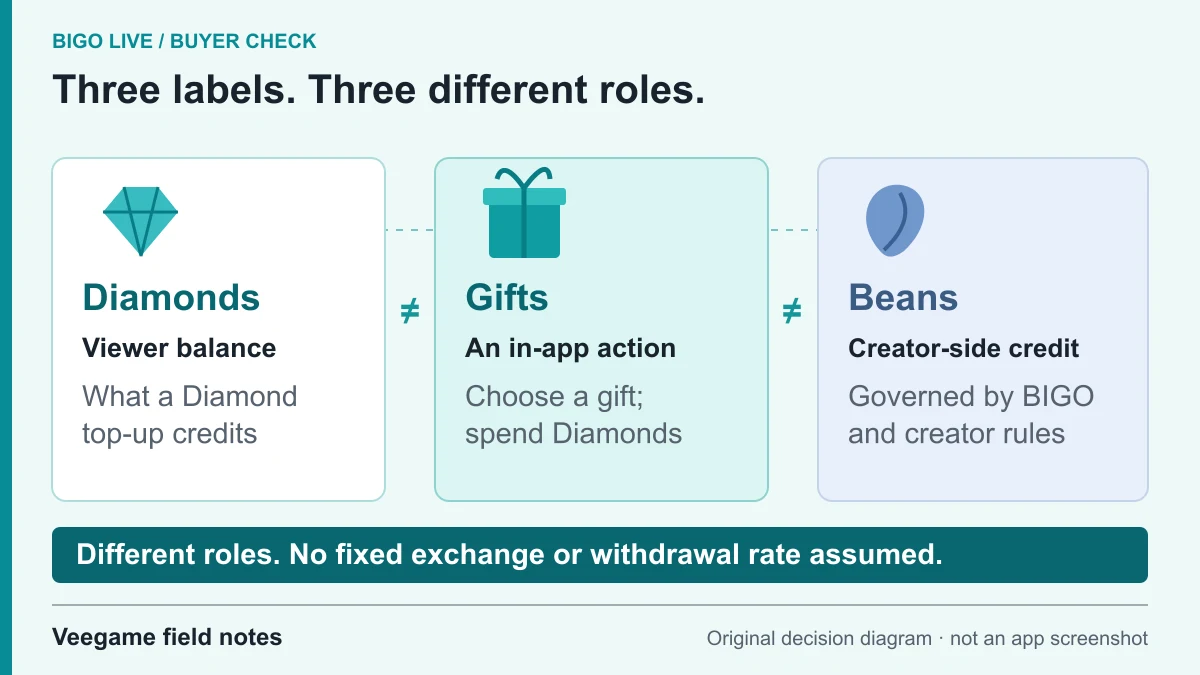
Original Veegame field notes · Primary reference. This is a decision diagram, not an app screenshot.
Sources and scope
BIGO’s official support center supplies the in-app submission route, attachment limits, tracking steps and payment-evidence fields. The timeline and message structure are our synthesis, not a tested response time or a promise that BIGO can resolve a third-party merchant payment.
- BIGO LIVE Support Center — recharge and payment evidence
- BIGO LIVE security guidance — password and code protection
Editorial sourcing and correction-contact information are explained in our editorial approach.