Follow the gift flow, not a supposed cash exchange
BIGO's official virtual-gift guide describes viewers acquiring Diamonds and spending them on gifts; broadcasters receive Beans. Its User Agreement separately states that Diamonds are used within BIGO and cannot be exchanged for cash. These are different functions, not two names for a retail recharge.
A Diamond order should therefore be evaluated by the Diamond amount and the destination BIGO account. It is not a Bean purchase, a withdrawal service or an income guarantee. A creator's ability to redeem Beans depends on the applicable BIGO rules and account conditions, rather than the price on a merchant's Diamond page.
Keep three entries in your notes: your real-money charge, your usable Diamond balance, and any creator-side balance that appears in the app. Do not multiply the merchant's Diamond price by a claimed Bean-to-cash rate to calculate a promised return.
| Record | What it answers | What it does not establish |
|---|---|---|
| Diamond package | How many Diamonds the order names | How much a creator can withdraw |
| Gift price in the current app | How many Diamonds that gift consumes | A universal Diamond-to-Bean ratio |
| Creator's Beans | A balance on the creator side | Your rechargeable Diamond balance |
| Payment receipt | The money charged for the order | The recipient's earnings |
Section references: BIGO LIVE official virtual-gift guide · BIGO LIVE User Agreement — Virtual Items
Turn your current gift choices into a Diamond target
Open the gift panel in the app and note the Diamond price beside each gift you intend to send. Include the quantity. An animated preview, an old video or a host's description is not a substitute for the current price shown on your account.
For an illustration, imagine three gifts at 60 Diamonds each and one gift at 120 Diamonds. The plan costs 300 Diamonds: 3 × 60 + 120. These are invented gift prices, not a BIGO catalog. If your account already has 80 usable Diamonds, the shortfall is 220 Diamonds.
Now compare available recharge packages with the shortfall and your money budget. Buying 500 additional Diamonds would leave 280 after the illustrated gift plan: 80 + 500 − 300. Whether that leftover is useful depends on what you actually want to do next; a large leftover is not automatically a saving.
Buying Diamonds for a friend and sending a gift are different actions
A direct recharge to a friend's BIGO ID adds the named Diamonds to the destination account. Sending a virtual gift from your own account uses your own Diamond balance in the app. Those actions have different recipients at different points in the flow.
For example, if you intend to send a gift yourself, do not enter the broadcaster's BIGO ID into a recharge form merely because you are supporting that broadcaster. That would choose a different Diamond destination. Decide first whether the desired action is an account top-up or an in-app gift.
Use the BIGO recipient check to compare the destination ID with the account you intend to recharge. Names and avatars can help you recognise a profile, but the form's delivery identifier is what needs to match. Passwords and one-time login codes should remain with the account owner.
Section references: BIGO LIVE official Direct ID recharge guide
Set the stop point before the live room gets busy
A practical gift plan names a maximum real-money spend and a maximum number of gifts. Keep it outside the live room so that changing event scores or requests in chat do not silently replace your plan. Participation should stay voluntary.
A minimum payment fee can make repeated small recharges more expensive than one order, but that is only one part of the decision. Compare final totals in checkout and do not enlarge the purchase solely to reduce the fee percentage. A smaller total outlay can still be the right result.
If you also use Likee, the Likee gift budget guide offers a similar shortfall worksheet. The budgeting method transfers; the platforms' balances and gift prices do not. A Likee Diamond is not a BIGO Diamond, even though the units have the same English name.
- Record the current Diamond cost of the gifts you actually chose.
- Subtract the balance already usable on the correct account.
- Review the complete payment charge before adding more Diamonds.
- Stop when the planned gift count or money limit is reached.
Keep the recharge record separate from the gift activity
If a balance looks different after the session, reconstruct both events. A Diamond recharge increases one balance; sending gifts consumes it afterwards. A screenshot taken only at the end cannot show those two changes on its own.
Save the recharge order reference and its named Diamond quantity, then note the later gift activity if you need support. The BIGO payment support guide explains how to distinguish a payment confirmation, a merchant delivery record and a balance observation. Do not repeat a payment simply to make an unresolved order easier to interpret.
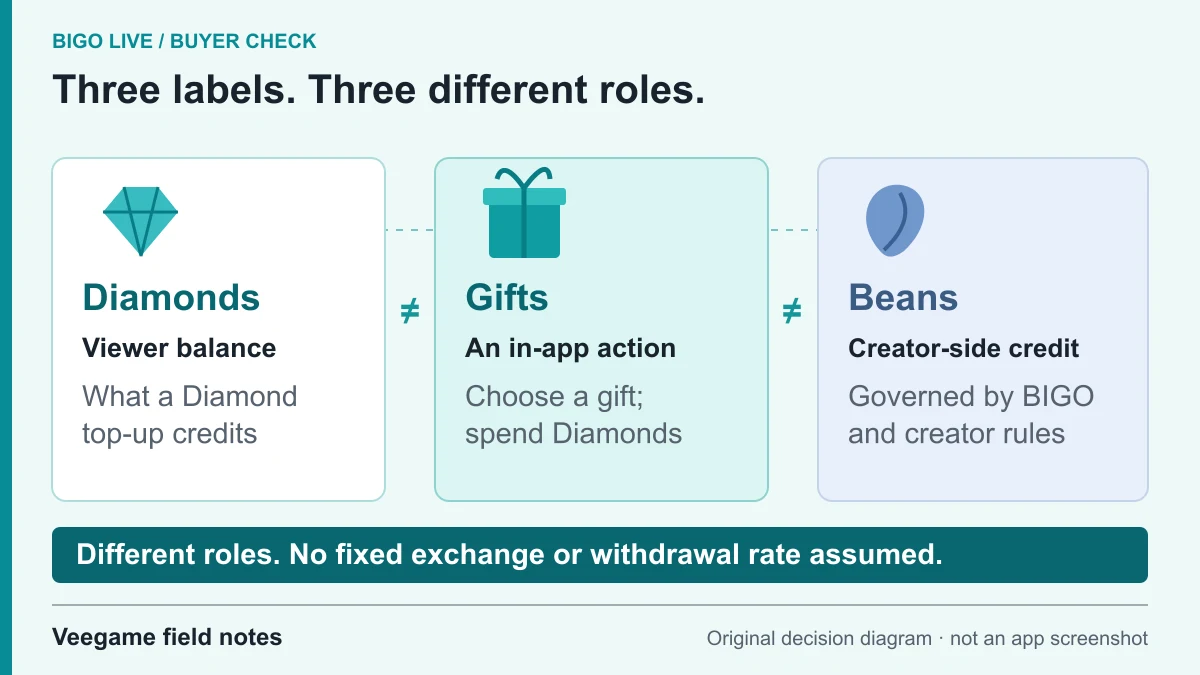
Original Veegame field notes · Primary reference. This is a decision diagram, not an app screenshot.
BIGO LIVE Operating Guide part 2 - diamonds and gifts, come to support your favorite hosts
By BIGO LIVE Official · Published 2021-10-03
- The official description explains that Diamonds are used to send gifts to broadcasters.
- It distinguishes Diamond purchases and gifts from sending hearts and supporting a host's popularity.
- Compare the gift cost visible inside the current app with your available Diamond balance before sending.
This guide was published in 2021. App screens, payment options and gift prices may have changed; check the current app. It explains BIGO gifting, not an individual Veegame order.
Watch on YouTube ↗ · Publisher referencePlayer availability may vary by region. If the player is unavailable, use the YouTube link.
Sources and scope
BIGO’s gift guide and virtual-item terms are the balance-role references. The gift target, shortfall and session limit are planning methods, not a Diamonds-to-Beans cash exchange or promised creator return.
- BIGO LIVE official virtual-gift guide
- BIGO LIVE User Agreement — Virtual Items
- BIGO LIVE official Direct ID recharge guide
Editorial sourcing and correction-contact information are explained in our editorial approach.