Where to find your Blood Strike player ID
Your Blood Strike player ID is a number tied to your game account. NetEase's official top-up center calls it the User ID, and many players search for it as the Blood Strike UID. The center's help image gives the path as Settings, then Account, then User ID.
Positions and labels can change with updates or differ on PC. If the gear has moved, open settings from the menu and look for the Account tab. Based on the official help image, the steps are:
- Step 1: Sign in to Blood Strike and wait for the lobby.
- Step 2: Tap the settings gear near the top-right of the lobby.
- Step 3: Open the Account tab.
- Step 4: Find the ID and tap the copy button beside the number.
Section references: NetEase official Blood Strike Top Up Center
Player ID, UID, User ID: one number
Different pages use different names. NetEase's top-up center says User ID. In its help image, the row inside the game's Account panel appears to read Account ID. Veegame's form says Player ID, and many players say UID. In each case the field wants the same numeric identifier from the Account tab.
What it does not want is your nickname, the login email or the linked sign-in service. The table separates the number you need from the details you should keep to yourself.
The help image also shows a Server row in the same Account panel. That is a game-side detail and is separate from the Gold group you choose at checkout. Veegame's Server field only offers Blood Strike; the Global or Middle East choice is made by picking the pack group, which is covered further down.
| What you might enter | Correct for a top-up? | Why |
|---|---|---|
| Numeric ID from Settings > Account | Yes | Identifies the account that receives Gold |
| In-game nickname | No | A display name that can change |
| Linked sign-in account or email | No | A login method, not a destination |
| Password or verification code | No | Never needed for a direct top-up |
| Your country or payment currency | No | Region is chosen separately as a Gold group |
Section references: NetEase official Blood Strike Top Up Center
Alternate logins and buying Gold for a friend
The same help image shows a row for linking the account to sign-in services. Linking is how you log in; it does not change which ID receives Gold. If you have played with more than one login, you may have more than one game account, each with its own ID. Copy the ID while signed in to the account that should receive the Gold.
For a gift, ask your friend to copy their ID from Settings > Account and send it as text, along with whether they play the Global game or the Middle East edition. A screenshot helps for comparison, but typing digits from an image invites errors. You never need their password or a verification code.
Section references: NetEase official Blood Strike Top Up Center
Your ID and your region are separate checks
A correct ID does not tell you which Gold group to choose. NetEase runs a separate official top-up center for its Middle East edition, titled Blood Strike Max, and Veegame lists Global and Middle East Gold as separate groups.
Confirm the edition you play before choosing a group; the app name and the store you installed it from are good clues. The Global or Middle East check explains the difference in more detail. Paying in a particular currency does not settle the question.
Section references: NetEase official Blood Strike Max (Middle East) top-up center
Entering the ID at checkout
On the Veegame Blood Strike Gold page, paste the ID into the Player ID field. The Server field has one option, Blood Strike, so leave it selected. The form does not look up your in-game name, so compare the pasted number with the game once more before paying. Then choose the Global or Middle East group that matches the account, read the full Gold label and review the item amount, payment fee and total on the review screen.
Keep the ID with your order reference. If the Gold does not appear, that pair is what support needs to trace the order. For pack choice and payment, follow the Blood Strike top up guide.
If you already entered the wrong ID
Contact support as soon as you notice, with the order reference, the ID you submitted and the ID you meant to use. Do not place a second order for the correct ID until you know the status of the first one, or you may end up paying twice.
Be realistic about the outcome. Currency delivered to another account is difficult to reverse, and a merchant cannot move Gold out of an account it does not control. The refund and order-problem guidance explains what support can and cannot do once an order has been fulfilled.
The best protection is the paste-and-compare habit: copy the ID from the game, paste it, then read it back against the Account screen before you pay.
Share the ID, never the login
A User ID identifies an account; it does not give access to it. Your login does. Blood Strike's official notice warns about sellers who ask for account access and then change passwords. It also says that Gold or items from suspected unauthorized top-ups can be removed and that accounts can be suspended.
Use these rules whenever someone asks for your Blood Strike details:
- Share the numeric ID when a top-up form or support agent asks for it.
- Never share your password, a verification code or access to your linked sign-in account.
- Treat a request to log in to your account for you as a reason to stop.
- Copy the ID from the game each time rather than reusing an old note for a different account.
Section references: Blood Strike official notice — unauthorized top-ups and refund abuse
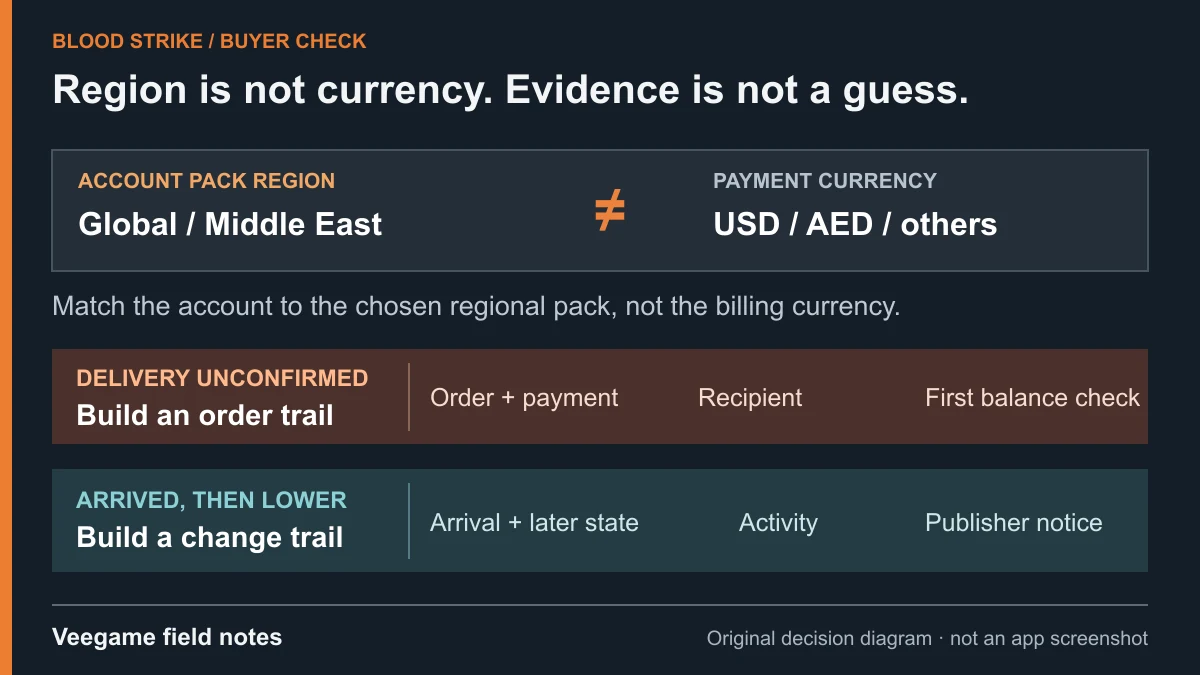
Original Veegame field notes · Primary reference. This is a decision diagram, not an app screenshot.
Sources and scope
The Settings > Account > User ID path comes from the help image on NetEase's official Blood Strike top-up center; in-game layouts can change. The Middle East center and the account-security warning come from NetEase and Blood Strike's official pages. A correct ID does not confirm region compatibility.
- NetEase official Blood Strike Top Up Center
- NetEase official Blood Strike Max (Middle East) top-up center
- Blood Strike official notice — unauthorized top-ups and refund abuse
Editorial sourcing and correction-contact information are explained in our editorial approach.