Blood Strike top up: what you need
A Blood Strike top up through Veegame needs three things: your numeric User ID, entered in the Player ID field; the Server field, which has one option, Blood Strike; and the Gold group that matches your account, Global or Middle East. If you want to know how to buy Blood Strike Gold without sharing a login, that is the complete set of account details. No password or verification code is requested.
Get the region right before anything else. NetEase runs a separate official top-up center for its Middle East edition, titled Blood Strike Max, and Veegame lists Global and Middle East Gold as separate groups. Have these ready:
- Your numeric User ID from the game's Settings > Account screen.
- Whether you play the Global game or the Middle East edition.
- The Gold pack you want, read as base Gold plus the extra named in the label.
- An order email and a payment method available in your charge currency.
Section references: NetEase official Blood Strike Top Up Center · NetEase official Blood Strike Max (Middle East) top-up center
Step 1: Copy your User ID
The help image on NetEase's official Blood Strike top-up center gives the path as Settings, then Account, then User ID. In that image the settings gear sits near the top-right of the lobby, and the number appears in the Account panel with a copy button beside it. Layouts can change between versions and platforms, so look for the Account tab in settings if the icon has moved.
Copy the number while signed in to the account that should receive the Gold. The separate guide on how to find your Blood Strike player ID covers alternate logins, gifting and what not to share.
Section references: NetEase official Blood Strike Top Up Center
Step 2: Choose Global or Middle East
Veegame's Blood Strike catalog has two groups with the same pack sizes: Global and Middle East. They are separate offers. Choose the group that matches your game account, not the currency you pay in or the country you are visiting.
If you are not sure which edition you have, check the app name and where you installed it from, and read the Global or Middle East region check before ordering. Ask support before payment if your account still does not clearly fit one group.
Blood Strike Gold packs
Both groups list six Gold packs. The first number in each label is the base Gold and the second is the extra named for that pack. Prices are quoted live at checkout, and the payment fee is shown before you submit.
NetEase's own top-up centers show their own pack list and bonus amounts, which do not match Veegame's labels and can change with promotions. Compare an offer by the total Gold its label states and the final amount due, not by a figure from another channel.
Gold packs are currency only. They do not include a Strike Pass, a skin or a draw result; NetEase's official top-up centers list the Strike Pass as a separate item.
| Pack label | Base Gold | Extra Gold | Stated total | Listed in |
|---|---|---|---|---|
| 100 + 5 Gold | 100 | 5 | 105 | Global, Middle East |
| 300 + 20 Gold | 300 | 20 | 320 | Global, Middle East |
| 500 + 40 Gold | 500 | 40 | 540 | Global, Middle East |
| 1,000 + 100 Gold | 1,000 | 100 | 1,100 | Global, Middle East |
| 2,000 + 260 Gold | 2,000 | 260 | 2,260 | Global, Middle East |
| 5,000 + 800 Gold | 5,000 | 800 | 5,800 | Global, Middle East |
Section references: NetEase official Blood Strike Top Up Center · NetEase official Blood Strike Max (Middle East) top-up center
Step 3: Place the order
With the ID and region settled, the checkout follows the steps below.
The form does not look up your in-game name, so the comparison in step 3 is your only check that the Gold goes to the right account. Take a moment over it.
Each order covers one pack. If you need more Gold than one pack provides, compare the next larger pack with two separate orders on the final amount due; two orders also mean two references and two payment fees to keep track of.
| Step | What to do | What to check |
|---|---|---|
| 1 | Open the Blood Strike Gold page and pick the Global or Middle East group | The group matches your game account |
| 2 | Choose a Gold pack | The full label, such as “1,000 + 100 Gold” |
| 3 | Paste your User ID into the Player ID field | Every digit matches the game |
| 4 | Leave the Server field on Blood Strike | It is the only option listed |
| 5 | Enter your order email, charge currency and payment method | Item amount, payment fee and total before submitting |
| 6 | Pay on the provider's page, then open your order record | Payment and delivery are shown separately |
After payment, and the publisher's warning
Check the order record first, then sign in to the game account whose ID you entered and look at your Gold balance. If the order shows delivered and the balance has not changed, confirm you are on the right account before contacting support with your order reference. Do not place a second order for the same ID while the first is being checked.
Blood Strike's official notice tells players to use official channels for top-ups. It says Gold or items from suspected unauthorized top-ups can be removed, and that temporary or permanent account suspension is possible. It also says refunded purchases deduct the matching Gold. Veegame is an independent reseller and does not claim a NetEase partnership; read the notice and decide which channel suits you.
The official top-up center is linked from the Top Up button on blood-strike.com. Whatever you choose, never give anyone your password: a direct top-up only needs the User ID and the right region.
Section references: Blood Strike official notice — unauthorized top-ups and refund abuse · Blood Strike official website — Top Up link and contact
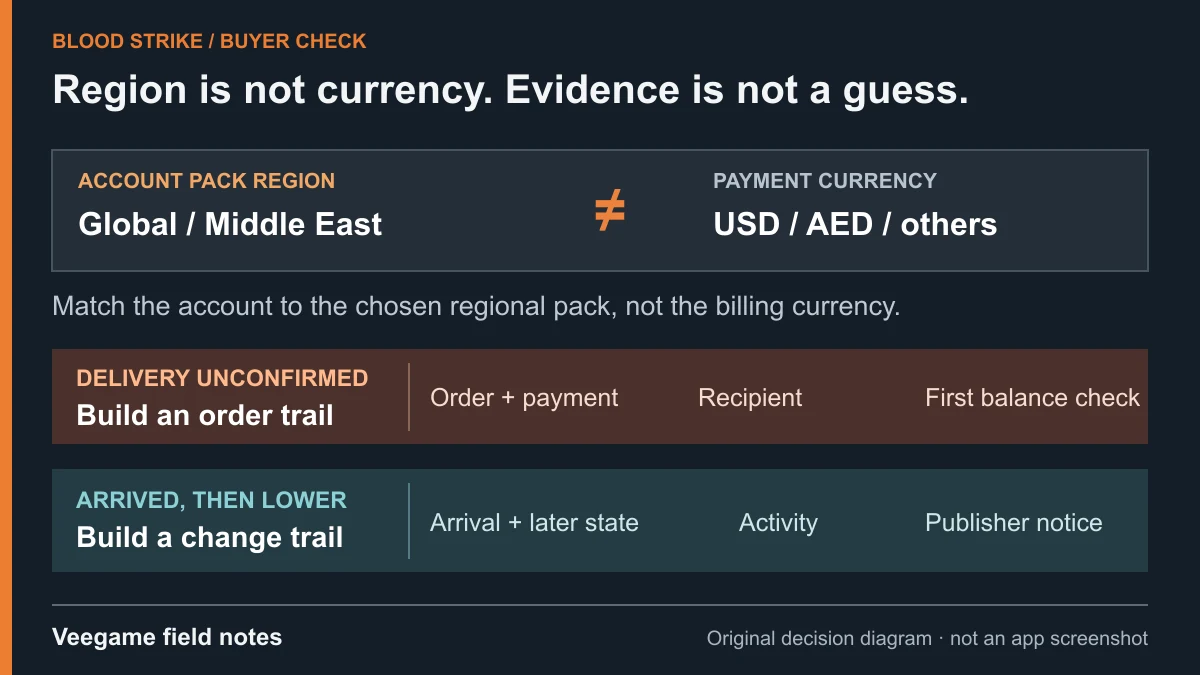
Original Veegame field notes · Primary reference. This is a decision diagram, not an app screenshot.
Sources and scope
The ID path, the separate Middle East center and Strike Pass listing come from NetEase's official top-up centers; the warning comes from Blood Strike's official notice. Veegame pack labels come from its catalog, and prices are quoted live at checkout. No publisher partnership is claimed.
- NetEase official Blood Strike Top Up Center
- NetEase official Blood Strike Max (Middle East) top-up center
- Blood Strike official notice — unauthorized top-ups and refund abuse
- Blood Strike official website — Top Up link and contact
Editorial sourcing and correction-contact information are explained in our editorial approach.