What the Wuthering Waves UID is
Your Wuthering Waves UID is the number that identifies your character. Top-up forms, friend searches and support requests use it because nicknames can be changed or repeated. On Veegame's checkout the field is labelled User ID, and it sits beside a separate Server selector.
The server half matters as much as the number. Kuro's official FAQ states that progress is not shared between servers, so one Kuro Games account can hold separate characters on Asia, SEA, HMT, Europe and America. A UID without its server is an incomplete address.
Think of the pair the way you would a street address and a city. The same house number can exist in several cities, and only the combination identifies one door. Whenever you save, send or paste your UID, keep the server name written right next to it.
Section references: Kuro Games official Wuthering Waves PS5 FAQ
Where to find your UID in the game
Kuro's public FAQ does not publish a screen-by-screen guide to the UID, so treat the path below as a general description. Labels and positions can vary by version, language and platform; the Terminal is the game's main menu, which Kuro's FAQ also refers to by that name.
Kuro's FAQ separately mentions Settings > Account Settings > User Center, which handles account linking, email binding and passwords. If a number shown there differs from the one on your character's profile, use the profile number of the character on the server you are topping up, and ask Kuro support if you are unsure which is which.
- Step 1: Log in and load the character you want to top up.
- Step 2: Open the Terminal, the game's main menu.
- Step 3: Look at the profile area, which shows your name and a numeric ID.
- Step 4: Use the copy option if one is shown, or write the number down carefully.
Section references: Kuro Games official Wuthering Waves PS5 FAQ · Official FAQ data served by Kuro Games
How to tell which server you play on
Check your server before you enter the UID anywhere. In many versions the server is shown, and can be changed, on the start screen before you enter the game; the server where your character has progress is the one to select. Wording on that screen may differ by version.
Kuro's FAQ describes the five servers by region and, for PS5, lists which PSN countries map to each. Veegame's Server selector uses the same five names. Location is not the rule for PC and mobile players: you may have created a character on a server outside your region years ago, and that is still the server to select.
| Veegame server option | Region in Kuro's FAQ | Example PSN regions from the FAQ |
|---|---|---|
| Asia | East Asia | Japan, Korea |
| SEA | South Asia, South East Asia and Oceania | Australia, India, Indonesia, Malaysia, Singapore, Thailand |
| HMT(HK, MO, TW) | Hong Kong, Macau and Taiwan | Hong Kong, Macau, Taiwan |
| Europe | Europe, Africa and Middle East | Germany, Saudi Arabia, South Africa, Great Britain |
| America | North, Central and South America | United States, Canada, Brazil, Mexico |
Section references: Kuro Games official Wuthering Waves PS5 FAQ · Official FAQ data served by Kuro Games
PlayStation 5 players
On PS5, Kuro says the available server is determined by the region of your PSN account; a PSN account registered in North America accesses the America server, for example. To continue an existing PC or mobile character on PS5, the PSN region has to match that character's server.
If your PS5 session shows a different character from your phone, you may be on a different server or a different linked account. Resolve that through Kuro's account-linking guidance before buying. The full country list is in the PSN server check guide.
Section references: Kuro Games official Wuthering Waves PS5 FAQ
Common UID mistakes before a top-up
A top-up goes to the exact UID and server submitted, so these are the errors worth checking for before you pay:
- Copying the UID from an old or secondary character instead of the one you play.
- Selecting the server closest to where you live instead of the server your character is on.
- Entering a nickname or a Kuro Games account email instead of the numeric UID.
- Typing the number from a screenshot and swapping two digits.
- Expecting purchases to move between servers; progress on different servers is separate.
Buying Lunites for someone else
When the top-up is a gift, the person who plays the character should supply both values. Ask them to copy the UID from their own game and tell you the server shown for that character, then send both as text rather than a cropped screenshot.
You do not need their Kuro Games email, password or a login code, and you should not accept them if offered. If they play on PS5, ask them to confirm the server from the game itself rather than guessing from their country, because the PSN account region decides it. Repeat the two values back to them before you pay; a gift sent to the wrong server is the hardest mistake to explain afterwards.
Using your UID and server at checkout
On the Wuthering Waves top-up page, paste the UID into the User ID field and pick the matching server. The form does not look up your character name or confirm the account for you, so compare both values with the game before paying.
Kuro's own Top-up Center works differently: you sign in to a Kuro Games account and buy for it. On Veegame you never enter your Kuro password or a login code. Once your UID and server are ready, the Wuthering Waves top up guide walks through pack choice, payment and delivery checks.
Keep a private note of the UID, the server and your order reference together. If anything needs tracing later, those three details are what support will ask for first.
Section references: Kuro Games official Wuthering Waves Top-up Center
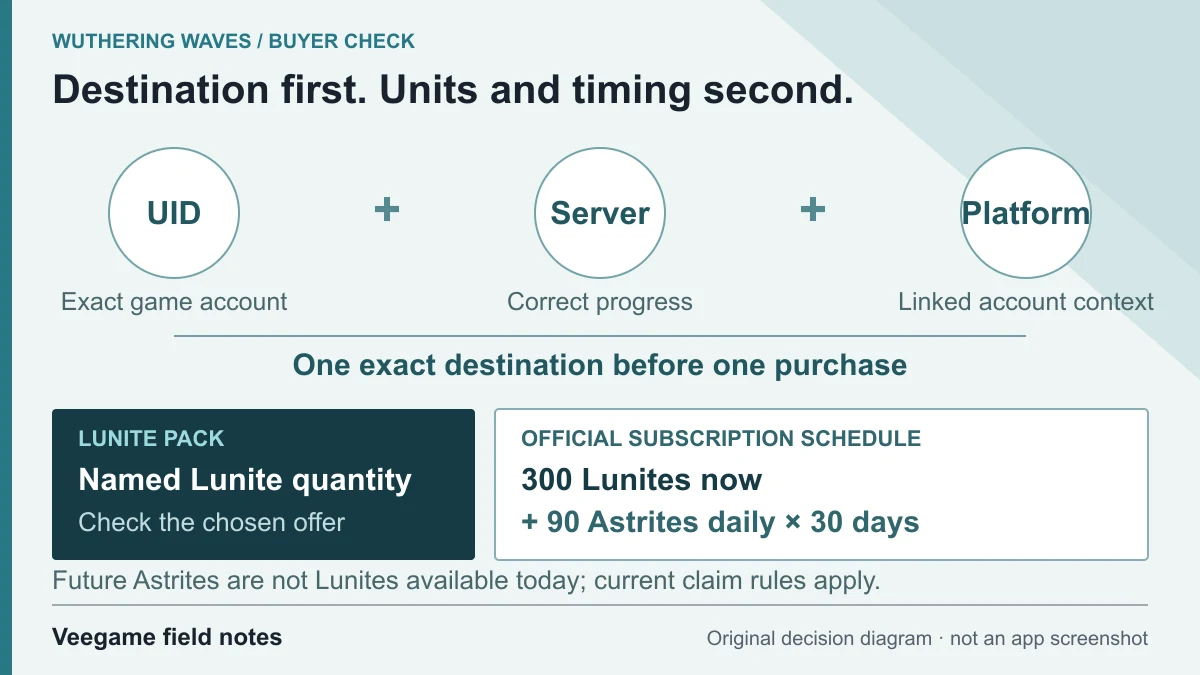
Original Veegame field notes · Primary reference. This is a decision diagram, not an app screenshot.
Sources and scope
Server separation, regions, PSN mapping and the User Center path come from Kuro's official PS5 FAQ. Kuro does not publish an in-game UID path there, so the Terminal steps are a general description that may vary by version. Neither source verifies a reseller's server coverage.
- Kuro Games official Wuthering Waves PS5 FAQ
- Official FAQ data served by Kuro Games
- Kuro Games official Wuthering Waves Top-up Center
Editorial sourcing and correction-contact information are explained in our editorial approach.