Wuthering Waves top up: what you need
A Wuthering Waves top up through Veegame needs two pieces of account information: your in-game ID, often called the UID, and the server that character plays on. If you are wondering how to buy Lunites without sharing a login, that pair is the whole destination. No password, email code or Kuro Games sign-in is entered on Veegame.
That differs from Kuro's own web Top-up Center, which asks you to sign in to a Kuro Games account before you shop. Both routes aim at the same result, Lunites credited to one character on one server, but the information you provide is different. Have these ready:
- Your UID, copied from the character you play.
- The server that character is on: Asia, SEA, HMT, Europe or America.
- The item you want: a Lunite pack or the Lunite Subscription.
- An order email and a payment method available in your charge currency.
Section references: Kuro Games official Wuthering Waves Top-up Center
Choose the right server first
Kuro's official PS5 FAQ states that progress is not shared between servers. A character on the Asia server and a character on the Europe server are separate, even under the same Kuro Games account, so the server is part of the destination.
The same FAQ describes each server's region. Use it as orientation, but the deciding fact is which server your existing character is on, not where you are today.
On PlayStation 5, Kuro says the server is set by the region of your PSN account. The PSN server check guide lists that country mapping in full.
| Server option at checkout | Region described in Kuro's FAQ |
|---|---|
| Asia | East Asia |
| SEA | South Asia, South East Asia and Oceania |
| HMT(HK, MO, TW) | Hong Kong, Macau and Taiwan |
| Europe | Europe, Africa and Middle East |
| America | North, Central and South America |
Section references: Kuro Games official Wuthering Waves PS5 FAQ
Lunite packs and the Lunite Subscription
Veegame lists six Lunite packs and the Lunite Subscription for Wuthering Waves. In labels with a plus sign, the first number is the base Lunites and the second is the extra amount named for that pack. The table adds them up; prices are shown live at checkout in your chosen currency.
Kuro's Top-up Center notes that its display of first-time top-up bonuses and purchase limits may be delayed and asks players to check the latest availability in the game. Treat first-purchase bonuses as conditions of Kuro's own channels, not as something a Veegame label adds. The Lunite Subscription is a schedule rather than one lump sum, so read its official terms before comparing it with a pack.
| Pack label | Base Lunites | Extra named | Stated total |
|---|---|---|---|
| 60 Lunites | 60 | None named | 60 |
| 300 + 30 Lunites | 300 | 30 | 330 |
| 980 + 110 Lunites | 980 | 110 | 1,090 |
| 1,980 + 260 Lunites | 1,980 | 260 | 2,240 |
| 3,280 + 600 Lunites | 3,280 | 600 | 3,880 |
| 6,480 + 1,600 Lunites | 6,480 | 1,600 | 8,080 |
| Lunite Subscription | Delivered on a schedule | See the official terms | Not a single lump sum |
Section references: Kuro Games official Wuthering Waves Top-up Center
How to buy Lunites on Veegame, step by step
With the UID and server confirmed, the order takes a few minutes. If you have not copied the UID yet, see how to find your Wuthering Waves UID first.
The form does not look up your character name or confirm that the UID belongs to you. It sends the order to the UID and server you enter, so steps 2 and 3 are where mistakes are caught.
Each order covers one item. If you want both a Lunite pack and the Lunite Subscription, place two orders and keep both references. Review the amount due for each, because the payment fee is calculated per order and the total is only final on the review screen.
| Step | What to do | What to check |
|---|---|---|
| 1 | Open the Wuthering Waves top-up page and pick an item | Lunite pack or Lunite Subscription; read the whole label |
| 2 | Enter your UID in the User ID field | Every digit matches the copy from the game |
| 3 | Select the server | The server your character is on, not your current location |
| 4 | Enter your order email, charge currency and payment method | Item amount, payment fee and total shown before submitting |
| 5 | Pay on the payment provider's page | Payment details are entered with the provider, not on Veegame |
| 6 | Check your order record, then the game | Delivery status first, then the in-game balance |
After the order: where Lunites appear
For purchases through its PlayStation Store and web store, Kuro's FAQ says items are processed for delivery after you log in to the game. It suggests restarting the game, checking Terminal then Backpack, and confirming you are on the account used for the purchase. The same habits help after any top-up: sign in to the character whose UID and server you entered, then check again.
Kuro also states that once accounts are linked, purchases made on one platform are available on the others. That holds within one server's character: Lunites delivered to an America character will not appear on an Asia character.
If the Veegame order shows delivered but nothing appears, do not buy again. Keep the order reference, the UID and server you entered and the time you checked, then contact Veegame support.
Section references: Kuro Games official Wuthering Waves PS5 FAQ
Official channels and resellers
Kuro sells Lunites in the game and through its official Top-up Center, which lists a wider range of items than a reseller catalog, including bundles and cosmetic packs. Veegame is an independent reseller; it does not claim to be a Kuro partner, and it sells only the Lunite packs and subscription listed above.
Whichever route you choose, the rule is the same: confirm the UID, the server and the exact item before payment, and never share your Kuro Games password or login code with anyone.
Section references: Kuro Games official Wuthering Waves Top-up Center
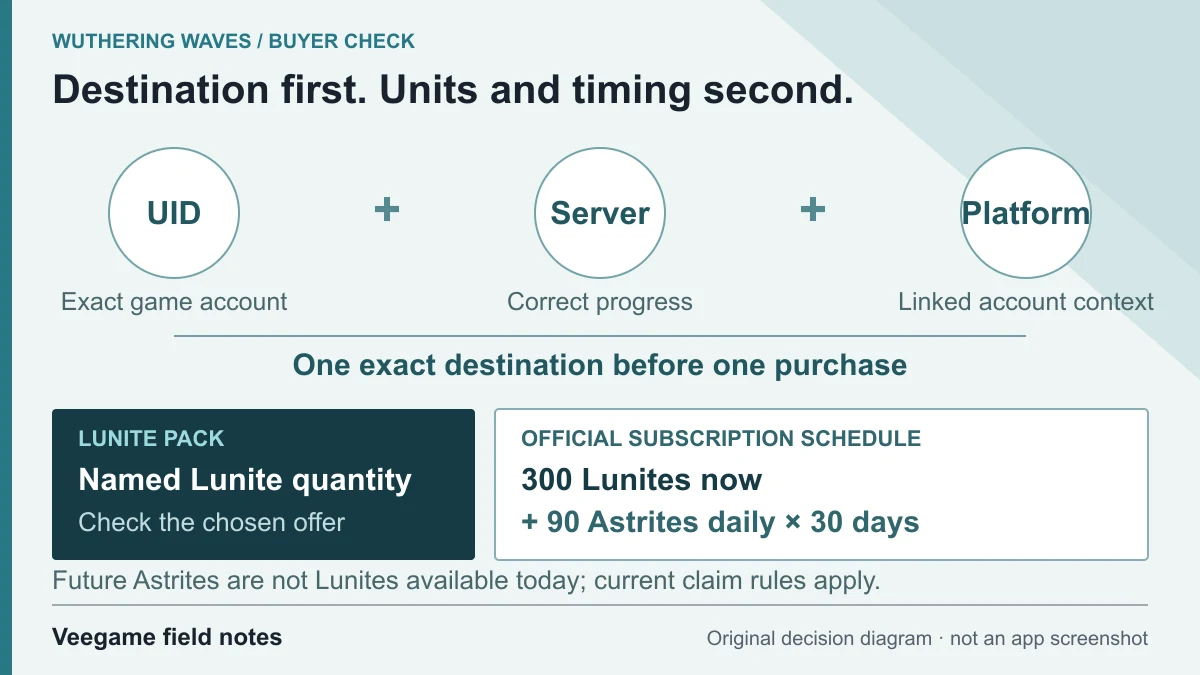
Original Veegame field notes · Primary reference. This is a decision diagram, not an app screenshot.
Sources and scope
Server regions, cross-platform rules and delivery checks come from Kuro's official PS5 FAQ; the login requirement and bonus-display note come from Kuro's Top-up Center. Pack labels come from Veegame's catalog, and prices are quoted live at checkout. Kuro's guidance does not certify a reseller's coverage.
Editorial sourcing and correction-contact information are explained in our editorial approach.