Write the real-money limit first
Likee's Terms of Use distinguish purchased Diamonds from other digital assets, and the developer's App Store description presents gifts as a way to support live creators. A Diamond purchase should therefore be evaluated as spending for the activity you intend to use it for.
Write a session or monthly limit in the currency you normally use for your budget. Decide whether that limit includes earlier purchases. A small package bought repeatedly can exceed a larger one-off spending plan, so a per-order limit alone may not control the total.
Keep that money limit visible while comparing packages. Converting it into a large virtual number can make the original charge easy to forget. A package is affordable only if its final charge fits the money limit you set.
Build the gift list from your current app
Look at the current prices of the gifts you plan to use. Record each gift's Diamond cost and how many times you intend to send it. Use the amount displayed at the point of selection, with a date beside the note; an old screenshot or a gift name from another market is not a current price.
The worksheet below does not contain invented live gift prices. You supply the values from your own screen, and the arithmetic simply turns your plan into a total.
If a gift has conditions you do not understand, leave it out of the calculation until those conditions are clear. You do not need to buy a larger package to investigate an unclear gift.
| Worksheet line | Enter from your own account | Calculation |
|---|---|---|
| Gift A | Current Diamond cost and intended count | Cost × count |
| Gift B | Current Diamond cost and intended count | Cost × count |
| Planned total | All gifts you actually intend to send | Sum of the lines |
| Already available | Usable Diamond balance now | Read the labeled balance |
| Shortfall | Additional Diamonds needed for this plan | Maximum of zero and planned total minus available balance |
Subtract the balance you can use today
Use your current usable Diamond balance, not an expected reward or a balance with a different label. If you plan to use multiple accounts, calculate each account separately rather than assuming you can move balances between them.
A zero shortfall means the recorded plan does not require an additional Diamond purchase. It does not mean that gifts are free: some or all of the existing balance may have been paid for earlier. Your money budget should still account for those earlier charges when relevant.
If your shortfall is positive, compare compatible packages that meet it. Leftover Diamonds have a practical cost: they represent money committed beyond this particular plan. Choose a larger quantity only if it fits an intentional future spending plan.
Compare the charge, then the usable quantity
Use the final payable amount after any disclosed payment fees. If the payment provider will charge in a different currency, distinguish the merchant's quote from the provider's eventual conversion. A displayed estimate is not evidence of the final bank debit.
For a package you can actually use, divide the final charge by the confirmed Diamond quantity to compare cost per Diamond. Only include a bonus if its eligibility and inclusion are clear for your account. An unverified conditional bonus should not make a package look cheaper.
A lower unit cost is one input, not an instruction to spend more. A package outside your money limit remains outside the plan even if its cost per Diamond is smaller. The Veegame Likee page is the place to inspect its current offer and charge; this guide does not substitute old public prices for a live quote.
Do not budget against someone else's earnings
The effect of sending a gift and the creator's eventual payment are different questions. Do not calculate your spending plan from an assumed creator payout, a claimed cash conversion or a promise that gifts will produce a financial return for you.
Terms for creator balances, account eligibility and withdrawals can have their own conditions. A retail Diamond package cannot establish that those conditions are met. If you need that information, read the platform's current official terms separately.
After the session, record what you spent, the balance remaining and the actual money charged. Compare the result with your original plan before another purchase. This small record is more useful for controlling spending than a leaderboard or a promotional package recommendation.
If two payment currencies look competitive, use the final-price comparison worksheet to separate the merchant's payment fee from any additional issuer cost and avoid counting the same charge twice.
- Planned gifts: priced from the current app.
- Current balance: the usable Diamond balance on the intended account.
- Selected package: compatible quantity and disclosed conditions.
- Total money spent: final charges across the whole budgeting period.
Section references: Likee Terms of Use — Diamonds and Paid Services
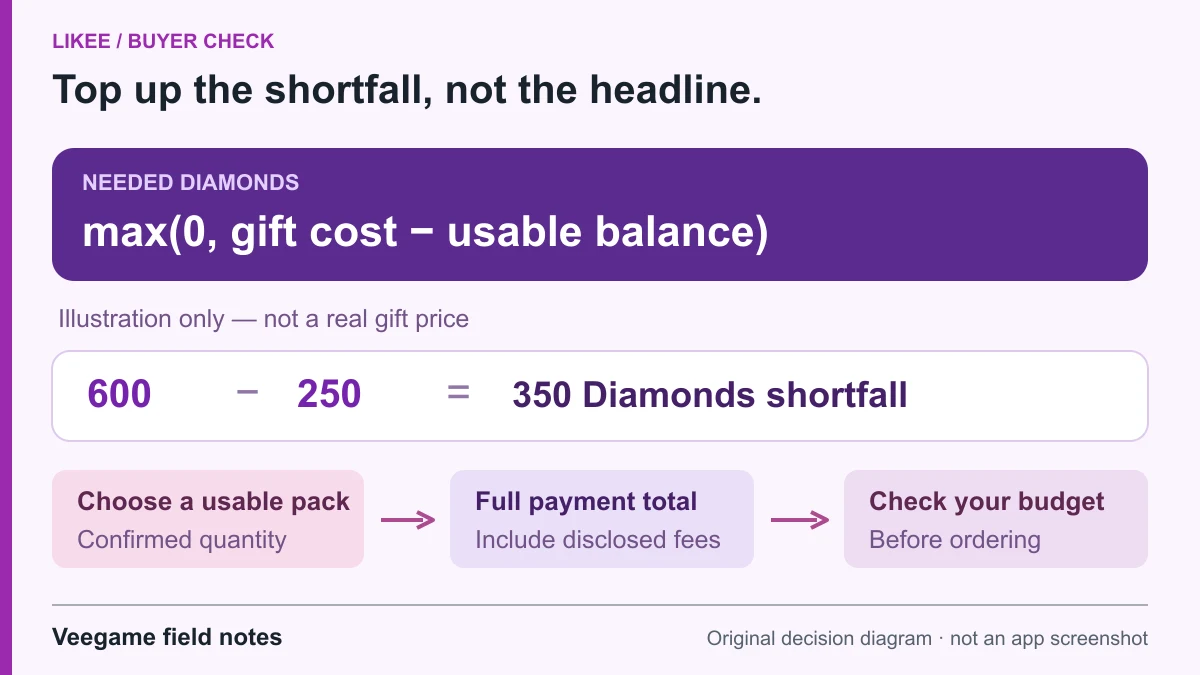
Original Veegame field notes · Primary reference. This is a decision diagram, not an app screenshot.
Sources and scope
The Diamond shortfall worksheet is original arithmetic. Gift costs and balances must come from the reader’s current app; examples are planning amounts, not current gift prices or creator payout rates.
Editorial sourcing and correction-contact information are explained in our editorial approach.