Confirm the account before choosing a Diamond pack
Likee’s official web recharge flow asks for a Likee ID and confirmation of the account information. Use the full identifier from the account you intend to recharge. A familiar display name or avatar helps recognition, but it does not replace that destination.
At Veegame, the pack form asks for the recipient ID and named Diamond quantity. It does not look up account ownership. Check the ID before payment, especially when buying for a friend or using more than one Likee account.
An account top-up is separate from sending a gift in a live room. Confirm which account should receive the Diamond balance; a recharge does not by itself send a gift to another person.
Section references: Likee official web recharge
Find the Diamond balance in Likee’s wallet
Likee’s official recharge FAQ directs users to Me, then wallet to check the Diamond balance. Open the intended Likee account first, then inspect that named balance rather than a reward total or a gift received by someone else.
When investigating an order, record the Diamond balance, account identifier and observation time privately. Note any gifts you sent or other recharges between observations. A current balance alone cannot show the amount delivered if Diamonds were spent afterward.
Compare the same account and balance before and after the order when you have both observations. If no starting screenshot exists, say so; do not present a later screenshot as proof of the starting balance.
Section references: Likee official web recharge · English FAQ resource served by Likee’s official recharge page
Missing Diamonds: separate the order from the app feedback
Read your original merchant order first. A payment confirmation, a merchant delivery status and the app balance describe different stages. Preserve the order reference, selected pack, submitted Likee ID, charge currency and payment evidence before trying another purchase.
For missing Diamonds, Likee’s official recharge FAQ gives this in-app route: Me, then Help and Feedback, then Feedback. Use the intended account and describe the balance problem with the relevant transaction reference and time. Menu labels may vary with the app version or language.
A Veegame order or payment-matching question goes to the processing-service contact shown on our order-help page. Likee’s app feedback route does not prove it can inspect the merchant’s payment records or decide that merchant’s refund request.
Keep passwords, one-time login codes and full payment-card numbers out of routine support evidence. Crop unrelated information from screenshots while leaving the relevant balance, reference and timestamp readable.
- Order record: pack, recipient ID, amount, currency and status.
- App evidence: intended account, named Diamond balance and observation time.
- Relevant timeline: other recharges, gifts sent or account changes.
- Follow-up: original order or feedback reference and the party reviewing it.
Section references: Likee official web recharge · English FAQ resource served by Likee’s official recharge page
A Diamond recharge does not promise a redeemable code
The account-credit offer on this page does not promise a portable code, a gift already sent or VIP benefits. If another seller advertises a code, verify its issuer and official redemption instructions separately. Likee’s recharge FAQ does not establish a redeemable Diamond-code programme; this guide does not certify one.
Section references: Likee official web recharge · Likee Terms of Use — Paid Services
Wrong recipient and purchase conditions need a separate review
Likee’s own recharge FAQ says a recharge to the wrong person cannot be refunded through that channel. That is a reason to check the destination before paying; it does not decide the outcome of a Veegame merchant refund request or override applicable consumer rights.
If a Veegame order contains the wrong ID, stop before payment where possible. For an order already accepted, preserve its original reference and contact the processing service promptly. Do not assume a delivered account top-up can be moved to another account.
Account region, charge currency and delivery method remain separate checks. Public Likee guidance does not verify the coverage of a particular merchant’s offer. Review the exact purchase conditions and use a channel whose terms you can verify.
The Likee currency comparison guide explains how to compare the same Diamond quantity using full checkout totals rather than bare money symbols.
Before buying for gifts, the gift-budget guide helps count the balance you already have and avoid purchasing for a target that is already covered.
Section references: Likee official web recharge · English FAQ resource served by Likee’s official recharge page
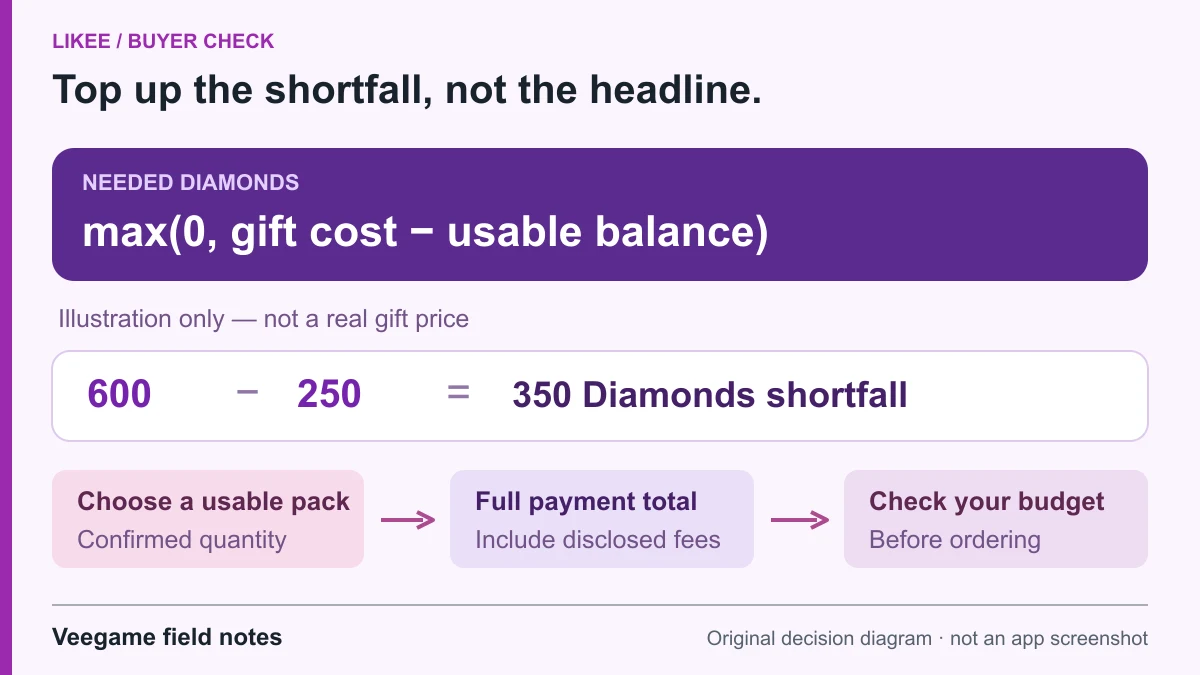
Original Veegame field notes · Primary reference. This is a decision diagram, not an app screenshot.
Sources and scope
Likee’s own recharge FAQ supplies the wallet and missing-Diamonds routes and its mistaken-recipient statement. Those describe that channel, not Veegame fulfilment or refund eligibility. The account/order timeline is our evidence-preparation method; no redeemable Diamond-code programme is verified.
- Likee official web recharge
- Likee Terms of Use — Paid Services
- English FAQ resource served by Likee’s official recharge page
Editorial sourcing and correction-contact information are explained in our editorial approach.