Begin with the app identity
The developer's App Store listing identifies Mango Live and names Diamond in-app purchases. The same listing also links to another app called Mango Star Audio Live. Those are separate product names, even though the apps share a developer.
This matters when a search result or recharge link includes a similar brand. A page on an official domain can still describe a different app. The public recharge path containing “mangostar” is not sufficient evidence that its fields or packages apply to Mango Live.
Check the name of the installed app and the developer shown by the store listing you used. Then make sure the merchant's product page names Mango Live. Do not rely on an orange icon or the word “Mango” alone to identify the destination.
Section references: Mango Live developer listing on the App Store — Diamonds and related apps · Mango Live developer listing on Google Play
Keep three kinds of region information separate
An account's applicable region, the availability of a particular package and the currency charged at checkout can be related, but they are not the same fact. A price converted to your currency is a presentation choice; account compatibility is a delivery requirement.
The table below is a set of questions to resolve, not a list of verified Veegame-supported countries. For Malaysia, Hong Kong, Singapore, North America, Europe, the Middle East and Oceania, a merchant still needs a precise product-specific answer.
| Context | Question to answer | Evidence to look for |
|---|---|---|
| Account | Which current Mango Live account will receive the order? | Its current identifier with the label visible |
| Product coverage | Does this exact package support that account's conditions? | The package's supported account and region terms |
| Payment | What currency and method will charge me? | The final checkout summary and provider's charge conditions |
Capture the recipient without guessing a format
Open the current account information in the official app and copy the identifier that the selected product requires. This guide deliberately does not prescribe a fixed ID length or a precise button sequence that has not been verified across current devices.
Keep the identifier with a short private account label and the app name. If you have more than one account, or if you are buying for someone else, confirm which one should receive the Diamonds before selecting a package.
Compare the value against the last order summary. If a recipient preview appears, check it as an additional clue. A recognizable name does not replace the identifier, and a successful form submission does not by itself prove account coverage.
- Installed product: Mango Live.
- Intended account: identifier copied from the current account.
- Package unit: Diamonds and the exact quantity.
- Compatibility: the package's stated account and region conditions.
- Payment: final amount, currency and method.
Treat unclear compatibility as an unresolved purchase
If your country or account region is not listed, do not choose a nearby country simply because it offers a lower price or enables a payment button. That changes a form entry without proving that the product supports your account.
If a listing uses “global” without explaining exceptions, ask the merchant's support route for the exact supported conditions or use the official app's purchase flow. A broad market label should not force you to infer the answer from the currencies in a selector.
Save any compatibility confirmation with the exact package reference. The answer for one quantity, delivery method or app may not apply to a different item. If support replies only with payment-method availability, the account-coverage question still needs an answer.
Review the product and recipient together
Put the app name, recipient identifier, Diamond quantity, compatibility statement and final charge on one short checklist. Read them from the same accepted offer. This prevents a screenshot of one product being used to justify an order for another.
Check whether the package contains only Diamonds or includes a separate benefit. A VIP illustration does not define the inclusion. If your goal is a specific privilege, the companion Diamonds-and-VIP guide explains what to look for in the terms.
On Veegame, inspect the current Mango Live product's actual requirements. Public developer listings establish branding and general product terminology; they do not establish Veegame's fulfillment geography or validate a particular recipient.
Keep a record that survives an app update
Save the complete order summary, the recipient confirmation and the order reference. Write the date and device context beside any app screenshot, keeping the original private and a redacted copy available for support.
An update can move interface elements without changing what you ordered. The record of the accepted product and submitted destination is therefore more useful than a remembered menu path.
If delivery is unresolved, report the original package and recipient rather than submitting a second order with different region entries. Changing several details at once makes it harder to investigate what happened.
If you switch Mango Live accounts or devices, the account-to-order record guide provides a private worksheet that keeps each UID attached to its package, receipt and timed wallet observation.
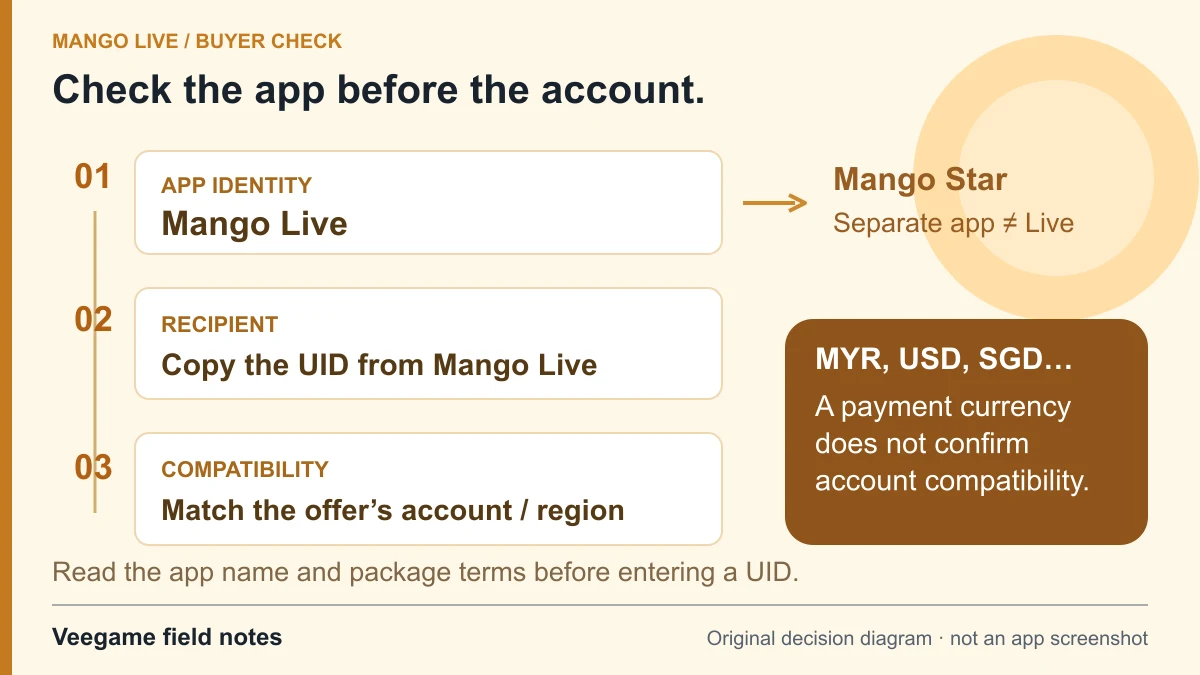
Original Veegame field notes · Primary reference. This is a decision diagram, not an app screenshot.
Sources and scope
Developer listings identify Mango Live and distinguish similarly named apps. They do not certify Veegame’s regional coverage. The account, package and settlement-currency checks are separate questions.
- Mango Live developer listing on the App Store — Diamonds and related apps
- Mango Live developer listing on Google Play
- Mango Star recharge page — a distinct product name
Editorial sourcing and correction-contact information are explained in our editorial approach.