Check the app identity before naming the account
The developer's App Store listing identifies Mango Live-Live Stream and separately lists Mango Star Audio Live among its other apps. Similar names do not make their accounts, balances or recharge entries interchangeable. Begin your record with the app's full name as well as its UID.
This matters on a shared device or when an old home-screen shortcut opens a different app. Do not reuse a UID merely because the profile photo looks familiar. Use the account currently open in the intended app as your starting point.
The Mango Live ID and region checklist covers that initial compatibility check. A record is valuable after the destination is clear; it cannot correct a wrong destination by making the paperwork more detailed.
Section references: Mango Live developer listing — app identity, Diamond products and support · Mango Live developer listing on Google Play
Create a private account-to-order map
Use a short local table rather than a public profile post. Give each account an ordinary private label such as Personal or Second account, then copy the exact UID from the app. Keep the label descriptive enough that you can identify it later without storing passwords.
For each purchase, add the merchant order reference, Diamond package, quantity, final charge and currency. Record the time zone beside the timestamp. A device name is helpful context, but the device is not the delivery identifier: signing into another account on the same phone changes the wallet you are observing.
The example below deliberately uses placeholders. It is a worksheet, not evidence of completed Veegame purchases, delivery tests or current Mango wallet navigation. Replace the placeholders with your own records and leave unknown fields marked unknown.
| Record | Account A | Account B |
|---|---|---|
| App and UID | Mango Live / copy exact UID | Mango Live / copy exact UID |
| Package and quantity | Copy selected Diamond label | Copy selected Diamond label |
| Merchant order | Original order reference | Original order reference |
| Final charge | Amount + ISO currency code | Amount + ISO currency code |
| Observation | Balance + local time + time zone | Balance + local time + time zone |
Finish one observation before switching accounts
Before paying, save the destination and the same labeled Diamond balance you intend to check afterwards. Once an order is reported as delivered, return to that account and observe that balance again. Include the time of both observations.
If you switch accounts before checking, do not infer delivery from whichever wallet opens next. Reopen the intended recipient and confirm the UID. The order reference should stay attached to that UID, even if the app remembered another account after a restart.
Avoid interpreting a before-and-after difference while ignoring intervening spending. If Diamonds were used for gifts, write down that activity. A wallet can receive a recharge and then fall again before the second screenshot. The timeline is what makes the two numbers understandable.
- Before checkout: intended UID, package and labeled starting balance.
- At checkout: original order reference, quantity, final amount and currency.
- After reported delivery: the same UID, the same balance label and observation time.
- Between observations: any known gifts or other balance activity.
A quantity control does not split Diamonds between UIDs
If the current Veegame Mango product form permits multiple units, the quantity repeats the selected package for the one recipient entered in that order. It is not an account distribution list. A quantity of two does not automatically create one pack for Account A and another for Account B.
Before a purchase for a different account, recheck the UID and keep a separate record for that destination. Do not carry an ID across accounts just because the package stayed the same. This is especially easy to miss when a browser restores a form or a notes app contains yesterday's copied identifier.
Package names also need to remain exact. A Diamond recharge does not prove that a separately desired VIP benefit was included. Use the Mango Diamond and VIP inclusion guide if your expected outcome includes more than the named Diamond balance.
Share the minimum evidence for the original order
For merchant support, identify the order and intended UID, describe what the order state says, and attach the relevant balance observation if requested. Keep unrelated account records out of that bundle. For an app-account issue, use the developer's current support route listed in the app or official store listing.
Redact unrelated messages, other users' details and full payment credentials before sharing screenshots. An order identifier and a charge amount can help find a transaction; a password or one-time code does not help prove that Diamonds arrived. Do not post the complete record publicly to obtain a faster answer.
If you also keep Poppo recharge records, its receipt checklist offers a useful timeline format. Transfer the format rather than assuming Mango and Poppo use the same wallet labels or support rules.
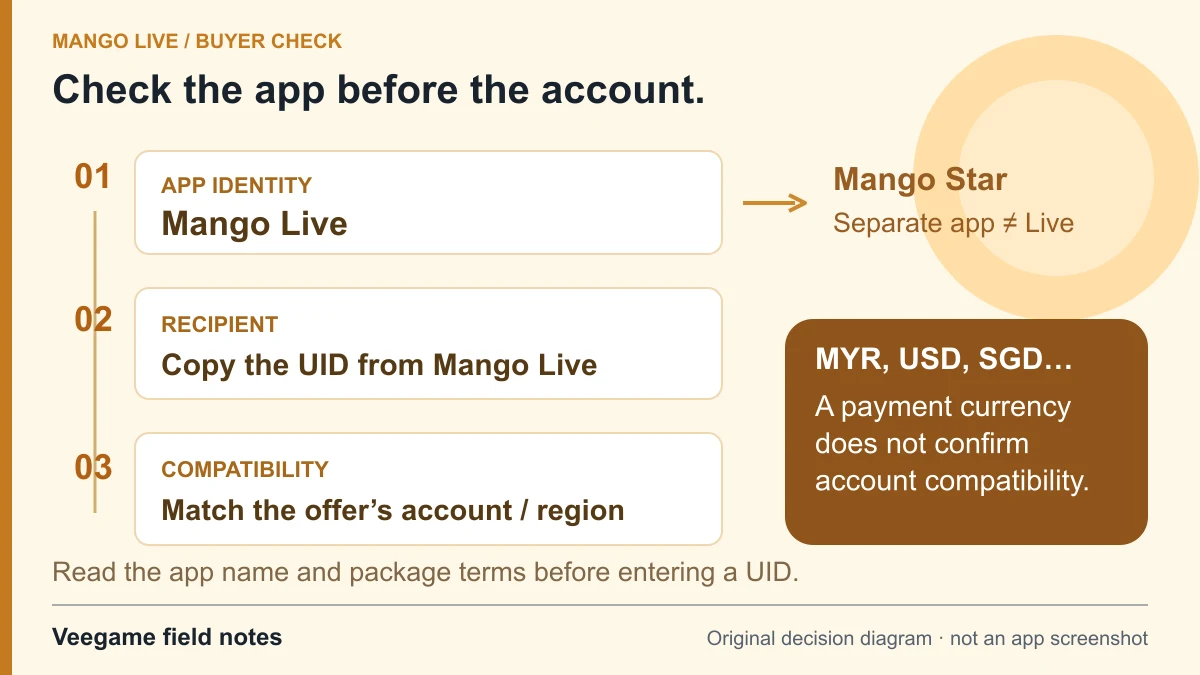
Original Veegame field notes · Primary reference. This is a decision diagram, not an app screenshot.
Sources and scope
The account-to-order map is an original record-keeping method. The app listings establish product identity; the purchase form sends one recipient per order and does not verify ownership or split a quantity between accounts.
- Mango Live developer listing — app identity, Diamond products and support
- Mango Live developer listing on Google Play
Editorial sourcing and correction-contact information are explained in our editorial approach.