How to find your PUBG Mobile ID in the game
If you want to know how to find your PUBG Mobile ID, start from your profile in the lobby. The PUBG MOBILE Help Center calls the number the Character ID (UID); top-up pages, including Midasbuy, call it the Player ID. Both refer to the same numeric identifier attached to your account.
According to the Help Center, the path in the current version of the game is:
- Step 1: Sign in to PUBG MOBILE and wait for the lobby to load.
- Step 2: Tap your profile icon in the upper-left corner of the lobby.
- Step 3: Open Info, then Basic Info, to see your Character ID.
- Step 4: Tap the copy icon next to the number to copy it.
Section references: PUBG MOBILE Help Center — Where can I find my Character ID (UID)? · Midasbuy official FAQ — PUBG MOBILE Player ID and UC delivery
What the Character ID looks like
The Help Center states that the Character ID contains numbers only and is different from your in-game nickname. That makes mistakes easy to spot: if what you pasted contains letters, spaces or symbols, it is not the ID. A stray space copied before or after the number is the most common invisible error, so check both ends of the field after pasting.
Your nickname, clan tag and avatar are display details. They can change, and other players can choose similar ones. The numeric ID is what support agents and direct top-ups use to identify the account. The table shows what to use and what to leave out.
| Item | Is it the Player ID? | Notes |
|---|---|---|
| Number on the Basic Info screen | Yes | Copy it with the copy icon |
| In-game nickname | No | Can be changed and is not a unique identifier |
| Login email, phone number or social account | No | Not needed for a direct UC top-up |
| Password or verification code | No | Never share it with a seller |
| Clan name | No | Describes a group, not your account |
Multiple accounts, devices and buying for a friend
Each account has its own ID. If you play on a second account, or sign in with a different login method on another device, the ID you see can differ. Copy it while signed in to the account that should receive the UC.
When buying for someone else, ask them to copy the ID from their own Basic Info screen and send it as text. A screenshot of their profile is useful for comparison, but typing digits from an image invites errors. You never need their password, login code or linked email.
Before a gift purchase, also confirm which game they play. A valid-looking ID does not tell you whether their installed app is the edition the UC product supports; the edition check explains the differences.
Using the ID at checkout
On the Veegame PUBG MOBILE UC page, the form asks for a single field: Player ID. Paste the copied number, then compare it with the game screen once more before payment. The form does not search by nickname and does not confirm that the ID belongs to you.
Keep a private note of the ID together with your order reference. If you ever need to trace a delivery, that pair is the first thing support will ask for. When the ID is ready, follow the step-by-step guide on how to buy PUBG Mobile UC to complete the order.
Save the ID before you need it
Because the Help Center says you may not be able to check the ID if you cannot sign in, it is worth saving it while you can. Copy it into a private note together with the nickname and the login method you use for that account.
Run through this short checklist each time you are about to paste the ID somewhere:
- It was copied from the Basic Info screen of the account you play now.
- It contains only digits, with no spaces before or after.
- It matches the saved note for that account, if you keep one.
- The person receiving UC, if it is a gift, confirmed it from their own screen.
Section references: PUBG MOBILE Help Center — Where can I find my Character ID (UID)?
Share the ID, never the login
A Player ID identifies an account; it is not a password. The Help Center notes that support or certain events may ask for it, and a direct top-up needs it. What you should never share is your login. PUBG MOBILE's official notice warns that unauthorized purchase services can lead to lost accounts and misuse of bank cards, and that purchases made through them can be removed.
If anyone asks for your password, a verification code or your account email in order to top up faster, stop. A direct top-up only needs the numeric ID, and Veegame's checkout has no field for a game password.
Section references: PUBG MOBILE Help Center — Where can I find my Character ID (UID)? · PUBG MOBILE official notice regarding unauthorized purchase services
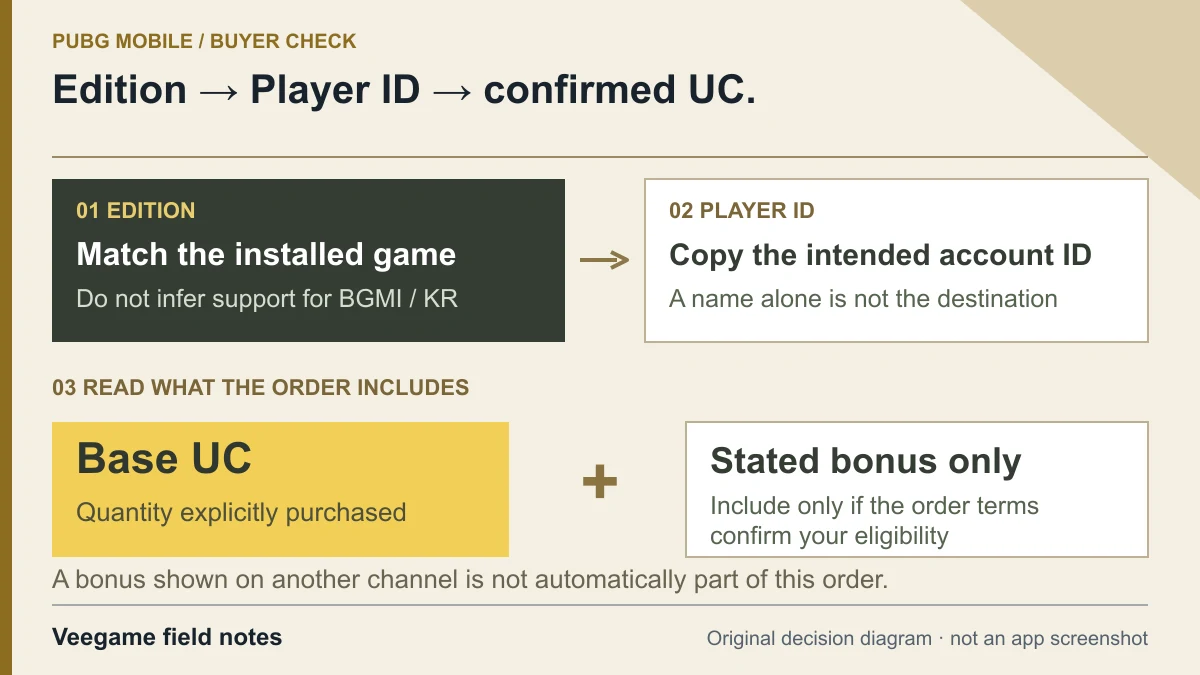
Original Veegame field notes · Primary reference. This is a decision diagram, not an app screenshot.
Sources and scope
The ID path and its notes come from the PUBG MOBILE Help Center; Midasbuy's FAQ gives the same location under another name. Menus can change with updates. A correct ID does not by itself confirm edition compatibility or verify account ownership.
- PUBG MOBILE Help Center — Where can I find my Character ID (UID)?
- Midasbuy official FAQ — PUBG MOBILE Player ID and UC delivery
- PUBG MOBILE official notice regarding unauthorized purchase services
Editorial sourcing and correction-contact information are explained in our editorial approach.