How to buy PUBG Mobile UC: what you need first
If you are searching for how to buy PUBG Mobile UC, the short answer is: copy your numeric Player ID from the game, choose a UC pack, review the live total and pay. A PUBG UC top up by Player ID does not need your game password, a login code or your account email. The ID tells the order where the UC should go.
Getting that ID right matters more than any other step. Currency delivered to a game account is difficult to reverse, so a few minutes spent on the checks below can save a long support conversation later. Have these four things ready before you open the checkout:
- Your numeric Player ID (the Help Center calls it the Character ID or UID), copied from the account you actually play.
- The name of the installed game, so you can confirm it is PUBG MOBILE rather than a separately published regional edition.
- The amount of UC you need, read as base UC plus any bonus named in the pack label.
- An email address for the order record and a payment method available in your chosen charge currency.
Step 1: Copy your Player ID from PUBG MOBILE
The PUBG MOBILE Help Center describes the Character ID as a unique number attached to your account. Its current instructions are to tap your profile icon in the upper-left corner of the lobby, open Info and then Basic Info, and tap the copy icon next to the ID. Midasbuy's FAQ points to the same place, which it calls the Personal Center at the upper left.
The ID contains numbers only and is different from your nickname. Nicknames can be changed and can look similar across accounts; the numeric ID is what identifies the destination. The Help Center also notes that menu locations can move after updates, so if a label looks slightly different on your device, look for the profile screen that shows the number beside a copy button.
If you have more than one account, copy the ID while signed in to the account that should receive the UC. The separate guide on how to find your PUBG Mobile Player ID covers alternate accounts, buying for a friend and common copy mistakes.
Section references: PUBG MOBILE Help Center — Where can I find my Character ID (UID)? · Midasbuy official FAQ — PUBG MOBILE Player ID and UC delivery
PUBG UC top up by Player ID: the order steps
Once you have the ID, the order follows the same four checks used for every Veegame top-up: recipient, pack, payment and delivery. The table lists them in the order you will meet them.
The form accepts a Player ID; it does not look up a nickname or confirm account ownership for you. That is why the paste-and-compare check in step 2 matters. A single swapped digit can send UC to a different account.
| Step | What to do | What to check |
|---|---|---|
| 1 | Open the PUBG MOBILE UC page and choose a pack | The full label, such as “600 + 60 Bonus UC”, not just the first number |
| 2 | Paste your Player ID into the Player ID field | Every digit matches the copy from the game, with no spaces |
| 3 | Enter your order email and choose the charge currency | The currency changes what you pay, not your game region or edition |
| 4 | Select an available payment method | The item amount, payment fee and total shown before you submit |
| 5 | Pay on the payment provider's page | Card or wallet details are entered with the provider, not on Veegame |
| 6 | Open your order record | Payment status and delivery status are listed separately |
Step 2: Choose the right UC pack
Veegame lists ten PUBG MOBILE UC packs, from 60 UC up to 30,000 + 10,500 Bonus UC. The number before the plus sign is the base UC and the number after it is the bonus the label names. Add the two to get the stated total: 600 + 60 means 660 UC.
Start from what you need rather than the largest bonus. Check the UC price of the item you want inside your own game, subtract the balance you already hold and pick the smallest pack that covers the gap. The full PUBG Mobile UC packs list shows every pack with its stated total and bonus rate.
Prices are not printed in this guide because they are quoted live at checkout in the currency you choose. Promotions on other channels, such as first-purchase or VIP extras on Midasbuy, belong to those channels' own terms. They are not added to a Veegame pack unless its label or order summary says so.
Section references: Midasbuy official PUBG MOBILE UC store page (United States)
Step 3: Check where the UC shows up
Midasbuy's FAQ says purchased UC is recharged directly to the game account and that the balance appears at the top right of the game screen. It also notes that network problems can delay arrival by a few minutes. Return to the lobby and check the balance again rather than relying on a screen that was open before payment.
Check your Veegame order record rather than a bank notification. A successful charge and a completed delivery are two separate states. If the order shows delivered but the balance has not changed, confirm that you are signed in to the account whose ID you entered.
If UC is still missing, do not place a second order for the same ID. Keep the order reference, the Player ID you submitted and a timed screenshot of your balance, then contact support. The UC not received guide walks through that process.
Section references: Midasbuy official FAQ — PUBG MOBILE Player ID and UC delivery
Official and third-party channels
Midasbuy describes itself as the officially authorized top-up store for PUBG MOBILE. The game's own notice warns that UC bought through unauthorized services can be removed and that accounts can be banned. Veegame is an independent reseller and does not claim publisher authorization, so read that notice before deciding where to buy.
Whatever channel you choose, never hand over your game password or a login code; a Player ID is all a direct top-up needs. If you are unsure which PUBG edition you play, resolve that before ordering, because a valid-looking ID does not prove that a UC product supports your edition.
Section references: Midasbuy official PUBG MOBILE UC store page (United States) · PUBG MOBILE official notice regarding unauthorized purchase services
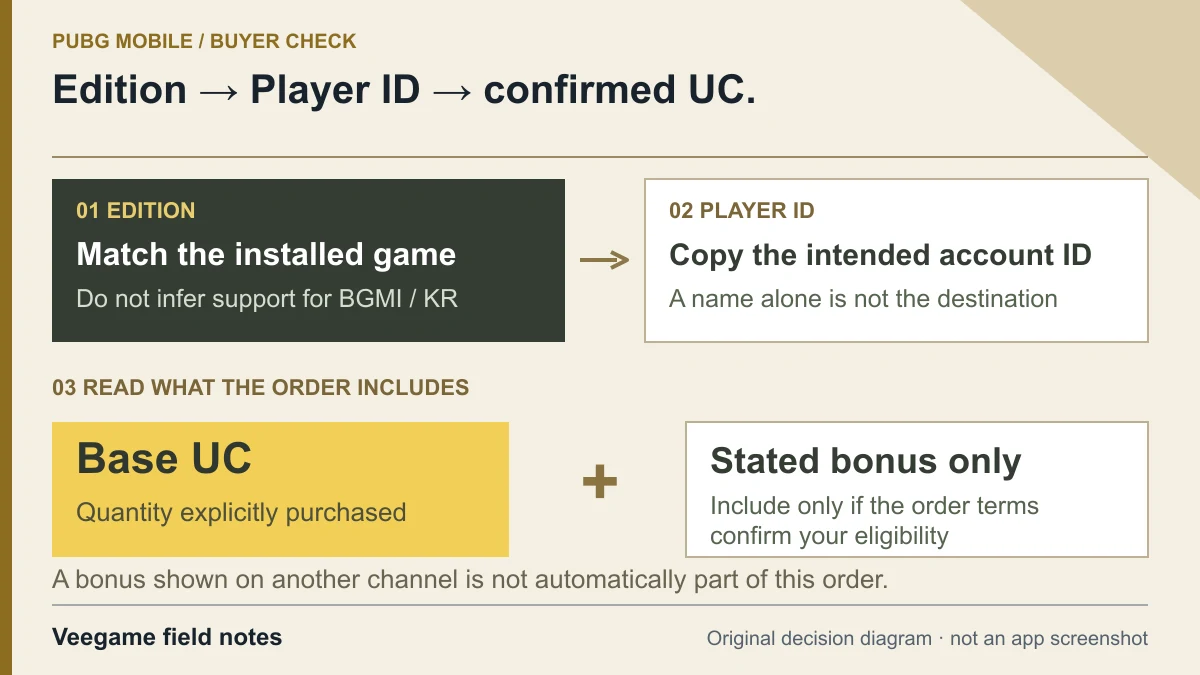
Original Veegame field notes · Primary reference. This is a decision diagram, not an app screenshot.
Sources and scope
In-game ID steps come from the PUBG MOBILE Help Center and Midasbuy's FAQ; both describe the current layout, which can change with updates. Midasbuy's tiers and authorization statement describe that official channel only. Veegame pack labels come from its own catalog, and prices are quoted live at checkout.
- Midasbuy official FAQ — PUBG MOBILE Player ID and UC delivery
- PUBG MOBILE Help Center — Where can I find my Character ID (UID)?
- PUBG MOBILE official notice regarding unauthorized purchase services
- Midasbuy official PUBG MOBILE UC store page (United States)
Editorial sourcing and correction-contact information are explained in our editorial approach.