Start with the label beside the number
Poppo's official website calls its purchase entry “Get Coins”, and the developer's US App Store listing names coin packages. These sources establish the purchase term. They do not establish a universal exchange rate between Coins, Points, creator rewards or any temporary event balance.
Open the current Poppo app while signed into the account you intend to recharge. Read the balance label in full, rather than identifying it only by its icon or position. A cropped screenshot showing a large number without its label is weak evidence of what an order will deliver.
If your screen includes Points or another reward label, keep it as a separate entry until the app's current help or applicable terms explain it. An agency advertisement, an old video or a comment describing a cash-out rate does not show that a coin package will increase that other balance.
A three-line note prevents a misleading comparison
Before comparing packages, make a short note that separates the thing you already hold from the thing the merchant sells. This is useful when you use more than one Poppo account, switch devices or see a promotion that uses different units.
The note below is a worksheet, not a claim about Poppo's current wallet layout. Fill it with the words you can see in your own app and the product listing. If a line is unclear, resolve that line before converting a price into a supposed value.
| Record | What to copy | What it establishes |
|---|---|---|
| Current balance | Exact label, amount, account identifier and time | Your starting point on that account |
| Purchased product | Package name, coin quantity and any stated conditions | What the order promises to add |
| Other balances | Each separate label, without an assumed conversion | Which numbers need their own explanation |
Read the package as a delivery promise
A useful package description tells you the unit, quantity and recipient requirement. It also separates the base amount from any conditional extra. If the title says Coins but the fine print refers to a reward, invitation task or withdrawal balance, do not treat those labels as interchangeable.
Check the final payable amount in your chosen currency and save the order summary. A price in SGD, MYR or USD describes a charge; it does not identify the Poppo balance that changes. Similarly, the availability of a payment method does not establish that every Poppo account region is supported.
The Veegame Poppo product page is the place to review its current package options. Public Poppo documentation cannot certify an individual merchant's supply coverage, account validation or bonus eligibility. Those details need to be explicit in the offer you are about to buy.
- Match the exact coin quantity to the selected package.
- Confirm the intended account using its identifier, not just a familiar name.
- Read any eligibility conditions beside a bonus.
- Keep the order reference and the complete product label together.
Compare the same balance after the order
After an order is reported as delivered, compare the same labeled balance on the same account. Record the observation time. If you have sent gifts between the two observations, a simple before-and-after subtraction no longer measures delivery on its own.
For example, a balance could rise after a top-up and fall again after spending. That does not prove the recharge was short. Conversely, a payment confirmation without a visible change does not prove delivery. The order record and the account observation answer different questions.
Do not manufacture a clean comparison by pretending there was no activity. If you spent coins, received an event reward or changed accounts, include that fact in a support request. A truthful timeline is more useful than a neat but incomplete screenshot.
Keep entertainment spending separate from earnings
Choose a spending limit in real money before purchasing virtual currency. A large coin number can feel cheaper than the card charge it represents, especially when you compare balances measured in different units.
A purchase should be evaluated for the activity you want to use it for. It should not depend on a claimed investment return, a host's expected income or an unverified ability to turn another wallet balance into cash. Creator payments and eligibility belong to their own current platform terms.
If your question is about money earned as a creator, start with the relevant official agreement and support route. A retail coin listing cannot answer that question merely by showing a coin price.
Once the balance unit is clear, use the final-cost pack comparison to choose a Coin amount that covers your shortfall without hiding payment fees or unnecessary leftover Coins.
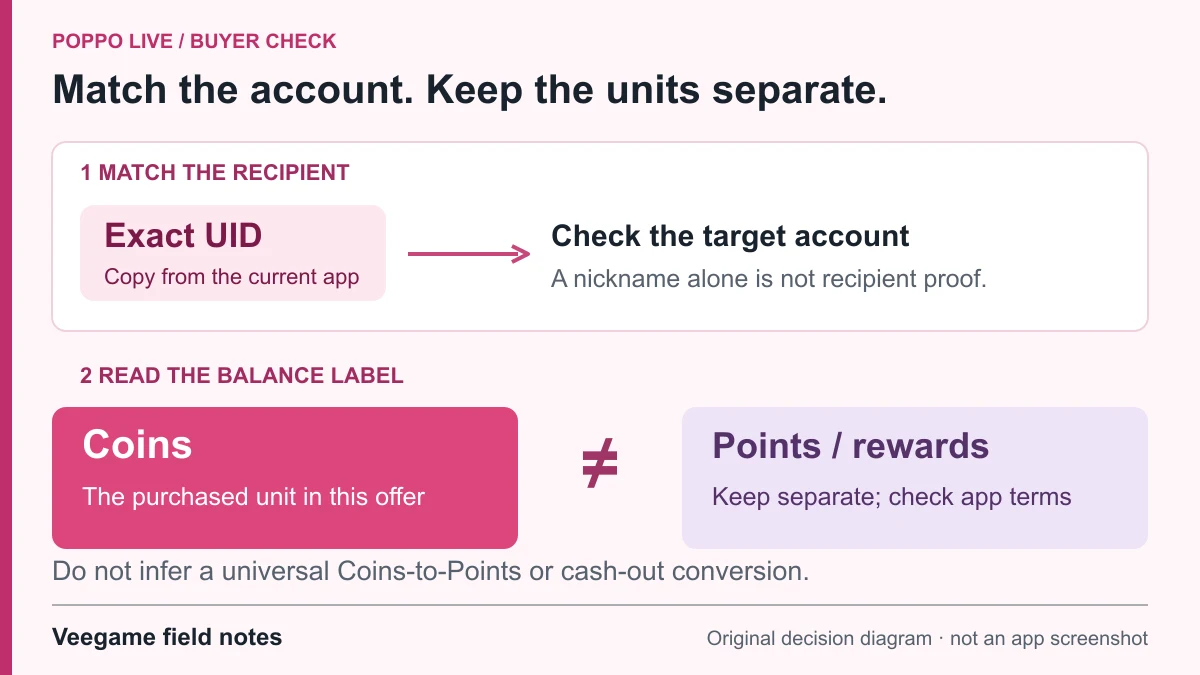
Original Veegame field notes · Primary reference. This is a decision diagram, not an app screenshot.
Sources and scope
The official coin entry and developer listing establish the app and recharge unit. The balance notebook is our comparison method; it does not establish a Points-to-cash conversion or creator income.
Editorial sourcing and correction-contact information are explained in our editorial approach.