BIGO Live recharge channels: official, app store and third-party
A BIGO Live recharge can come through three kinds of channel. BIGO runs an official web recharge page with a Direct ID mode and a Log In mode. The BIGO LIVE app sells Diamonds through your app store account. Third-party sites - resellers such as Codashop or Veegame - sell Diamond top-ups to a BIGO ID under their own terms.
The difference that matters most is who you are contracting with. On the official page or in the app, the purchase is with BIGO or the app store. On a reseller site, your order and payment are with that reseller, and the reseller then arranges the top-up. Support for a payment question starts with whoever took your money.
| Channel | Who you pay | Account identified by | First stop for a payment problem |
|---|---|---|---|
| BIGO official web recharge | BIGO | BIGO ID (Direct ID) or signing in (Log In) | BIGO support via Help & Feedback |
| In-app purchase | Your app store account | The signed-in account | App store purchase history, then BIGO |
| Third-party reseller | The reseller | The BIGO ID in the reseller's form | The reseller, with its order reference |
Section references: BIGO LIVE official recharge guide - Direct ID and Log In modes · BIGO LIVE Support Center - Help & Feedback route and recharge evidence
What BIGO's own pages say
It is fair to start with the platform's position. BIGO's recharge guide describes its linked site as the only authorized platform operated by Bigo Technology, and BIGO's Support Center tells users to always use an official BIGO LIVE recharge channel. Veegame is a reseller, not BIGO's official channel, and readers should weigh that statement for themselves.
BIGO's safety guidance adds warnings that apply to every site: do not trust a page simply because it displays the BIGO LIVE logo, an official recharge never needs the recipient's password or OTP, and no generator can produce free Diamonds.
None of these pages names individual resellers, and this guide does not claim that any particular reseller is authorized, endorsed or prohibited by BIGO.
Section references: BIGO LIVE official recharge guide - Direct ID and Log In modes · BIGO LIVE Support Center - Help & Feedback route and recharge evidence · BIGO LIVE safety guidance - passwords, codes and imitation pages
What a reseller listing typically looks like
People often search for Codashop BIGO Live because Codashop is a widely used example of a reseller. Its BIGO LIVE page, operated by Coda Payments, asks for a Bigo Live user ID and lists Diamond packages with prices in the local currency of the regional store. That is the general shape of a reseller listing: an ID field, a list of packs, and the seller's own payment options.
Veegame works the same way: one BIGO ID field, a list of Diamond packs, and a checkout that shows the item amount, the payment fee and the total. We do not compare our prices with any named seller here, because prices change and depend on currency and payment method.
Section references: Codashop BIGO LIVE Diamonds page (Philippines) - an example of a reseller listing
Checks to make on any recharge site
Whichever channel you choose, the same short checklist protects you. It works for the official page, an app store purchase and every reseller, including this one.
If a site fails one of these checks - for example it asks for your password, or you cannot tell who is charging you - stop and use another channel.
- The address: the site is the one you meant to visit, not a lookalike reached from a message or advert.
- The identifier: only a BIGO ID is requested - never a password or one-time code.
- The product: the pack is labelled Diamonds, not Beans or an unspecified bundle.
- The seller: you can see who takes the payment and how to contact them.
- The total: the final amount, currency and any payment fee are shown before you pay.
- The terms: refund and order-problem terms are published and readable.
- The record: you receive an order reference you can quote later.
Section references: BIGO LIVE safety guidance - passwords, codes and imitation pages
Reading discount and bonus claims
Both BIGO and resellers advertise savings. BIGO's recharge page says its web channel bypasses app store fees and mentions recharge bonus deals; resellers often show percentage discounts. Treat any of these as claims to check rather than facts about your order.
The reliable comparison is simple: the same Diamond quantity, the same currency and the final amount you would pay, including any payment fee. A bigger discount figure on a banner does not help if the final total is higher or if the Diamonds go to the wrong ID.
Section references: BIGO LIVE official recharge guide - Direct ID and Log In modes
When something goes wrong: who to contact
BIGO's Support Center describes an in-app route - Me, then Help & Feedback - and asks for details such as the BIGO ID, amount, currency, payment channel and transaction ID. That route suits purchases made through BIGO's own channels and app-side balance questions.
For a reseller order, start with the reseller, because only it holds your payment and order records. At Veegame, keep the order reference and payment evidence; our refund and order-problem guidance explains how a review works. Our guide to BIGO Diamonds missing after payment shows how to put the evidence together.
Section references: BIGO LIVE Support Center - Help & Feedback route and recharge evidence
Making the choice
There is no single right answer for everyone. Buying through BIGO's own channels follows the platform's stated recommendation and keeps the purchase and the app-side support in one place. An in-app purchase uses an app store account you may already trust and its purchase history. A reseller can offer different currencies or payment methods, but you rely on that reseller's terms and support for the order.
Whichever you pick, the order should leave you with three things: a clear record of who charged you and how much, the BIGO ID the Diamonds were sent to, and a support contact that can see your transaction. If a channel cannot give you all three, it is worth choosing another one.
Finally, keep the scale of the purchase in proportion. A first order through any new channel can be small, so you can confirm the ID, delivery and balance before spending more.
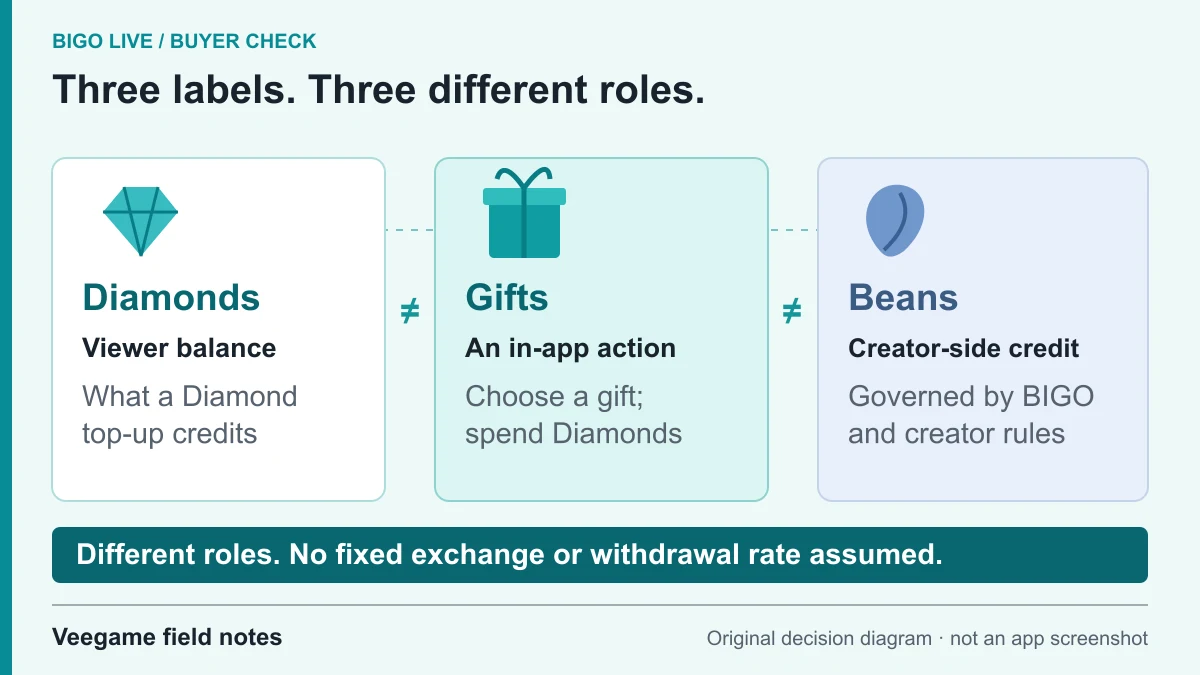
Original Veegame field notes · Primary reference. This is a decision diagram, not an app screenshot.
Sources and scope
BIGO's recharge, support and safety pages supply its own statements about official channels, credentials and support. Codashop is cited only as an example of a reseller listing, from its public page; no claim is made about its prices, authorization or service. The checklist is our method and applies to Veegame too.
- BIGO LIVE official recharge guide - Direct ID and Log In modes
- BIGO LIVE Support Center - Help & Feedback route and recharge evidence
- BIGO LIVE safety guidance - passwords, codes and imitation pages
- Codashop BIGO LIVE Diamonds page (Philippines) - an example of a reseller listing
Editorial sourcing and correction-contact information are explained in our editorial approach.