BIGO LIVE recharge options: official page, app and resellers
BIGO publishes its own web recharge guide. It describes two modes: Log In, where you sign in and can see your balance, and Direct ID, where you enter a BIGO ID without a password or one-time code. BIGO's page calls its linked site the only authorized platform operated by Bigo Technology.
You can also buy Diamonds inside the BIGO LIVE app through your app store account. Resellers, including Veegame, offer a third route: they top up the BIGO ID entered in their order form, much like the Direct ID mode. A reseller is not BIGO, and its order, price and support terms are its own.
Which route suits you depends on what you value: buying directly from the platform, using your app store account, or a reseller's currencies and payment methods. Our comparison of official and third-party BIGO recharge goes through the checks that apply to any of them.
Section references: BIGO LIVE official recharge guide - Direct ID and Log In modes
What you need before you buy BIGO Diamonds online
For a Direct ID style top-up, the BIGO ID is the destination. A display name can be changed and copied by others, so it is not a safe way to identify the account. Open BIGO LIVE on the intended account and copy the ID from its profile. If you are buying for someone else, ask them to send it to you in writing.
BIGO's safety guidance states that an official recharge never needs the recipient's password or OTP. The same applies to an ID top-up through a reseller: the Veegame form asks only for the BIGO ID.
- The BIGO ID of the account that should receive the Diamonds.
- Your current Diamond balance, so you can check delivery later.
- An email address for the order record.
- A payment method available in your chosen charge currency.
Section references: BIGO LIVE safety guidance - passwords, codes and imitation pages
Step by step: BIGO LIVE recharge by BIGO ID
These steps follow the Veegame order flow. Each order covers one Diamond pack, so if you need more than one pack, place them as separate orders and keep each reference.
Prices come from the order service at the time you check out and can change with the exchange rate. If a quote refreshes before you submit, review the new amount rather than relying on the earlier one.
- Step 1 - Open the BIGO LIVE Diamonds page and select a pack from the list below.
- Step 2 - Paste the BIGO ID into the BIGO ID field and compare it with the profile.
- Step 3 - Enter your order email and choose the charge currency.
- Step 4 - Choose an available payment method and review the item amount, payment fee and total.
- Step 5 - Complete payment on the payment provider's page.
- Step 6 - Open your order record and check payment and delivery status separately.
- Step 7 - Check the Diamond balance on the same BIGO account.
BIGO LIVE Diamond packs we list
The table shows the 13 Diamond packs currently offered on our BIGO LIVE Diamonds page. Each is a direct top-up to the entered BIGO ID. The third column is only a rough way to think about size; it is not advice about how much to spend.
No price is listed here because the amount is calculated at checkout from the current price, exchange rate and payment fee. Beans, VIP or other BIGO balances are not sold as part of these packs.
| Pack label | Diamonds delivered | Typical use |
|---|---|---|
| 100 Diamonds | 100 | Topping up a small shortfall |
| 500 Diamonds | 500 | Topping up a small shortfall |
| 1,000 Diamonds | 1,000 | Topping up a small shortfall |
| 1,400 Diamonds | 1,400 | Planned gifting over several sessions |
| 2,000 Diamonds | 2,000 | Planned gifting over several sessions |
| 3,000 Diamonds | 3,000 | Planned gifting over several sessions |
| 4,000 Diamonds | 4,000 | Planned gifting over several sessions |
| 5,000 Diamonds | 5,000 | Planned gifting over several sessions |
| 6,000 Diamonds | 6,000 | Planned gifting over several sessions |
| 8,000 Diamonds | 8,000 | Larger planned spending - check leftover |
| 10,000 Diamonds | 10,000 | Larger planned spending - check leftover |
| 20,000 Diamonds | 20,000 | Larger planned spending - check leftover |
| 30,000 Diamonds | 30,000 | Larger planned spending - check leftover |
After payment: what to check and when to ask
Treat payment, order delivery and the app balance as three separate records. Payment confirmation shows money moved; the order record shows whether the top-up was delivered to the BIGO ID you entered; the app shows the balance on the account you are viewing.
For its own channel, BIGO's recharge guide says transactions are usually instant and suggests contacting BIGO support through the app if Diamonds have not appeared after 30 minutes. That describes BIGO's channel, not a promise about any reseller order. For a Veegame order, check the order record and contact Veegame support with the original reference if the balance does not match.
BIGO's Support Center advises not to repeat a payment while the original transaction is under review. That is sensible for any channel: a second payment creates a second order, not a faster first one.
Section references: BIGO LIVE official recharge guide - Direct ID and Log In modes · BIGO LIVE Support Center - Help & Feedback route and recharge evidence
Stay safe while recharging
BIGO's safety guidance warns that no generator or hack can create free Diamonds and that a page should not be trusted just because it displays the BIGO LIVE logo. Those warnings apply to every recharge site, including resellers.
Before entering anything, confirm the website address, the product name (Diamonds) and the recipient ID. Keep the order email and reference somewhere you can find them. Our BIGO ID recipient check covers the ID step in more detail.
Section references: BIGO LIVE safety guidance - passwords, codes and imitation pages
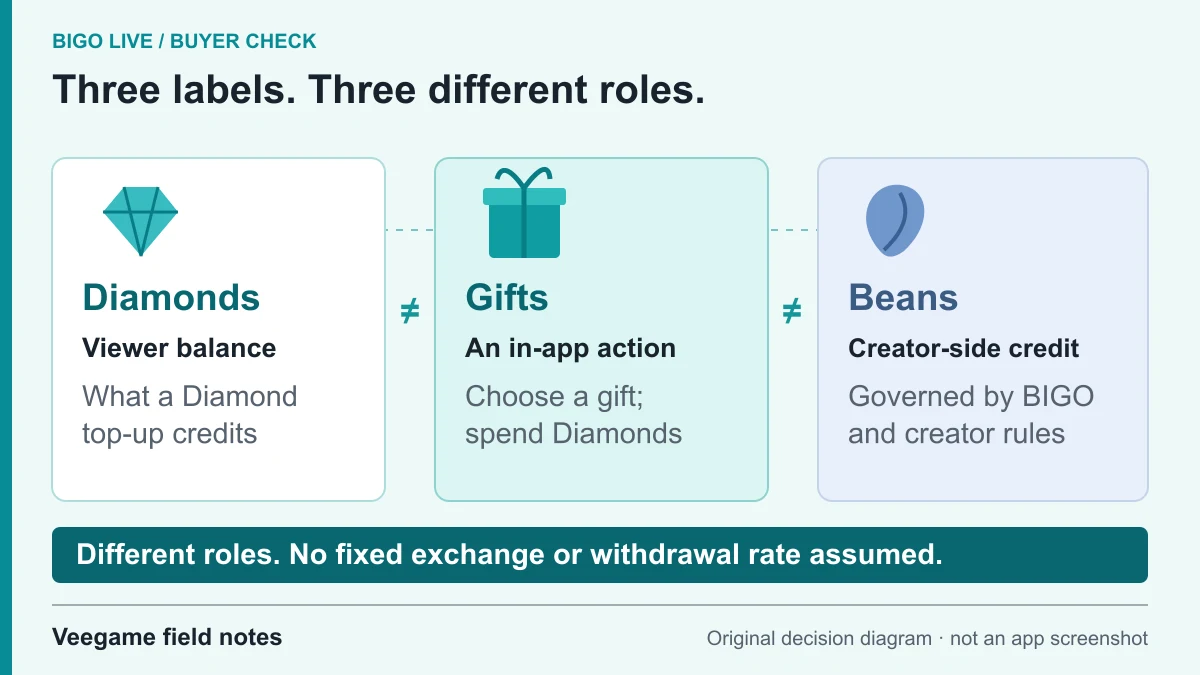
Original Veegame field notes · Primary reference. This is a decision diagram, not an app screenshot.
Sources and scope
BIGO's official recharge, support and safety pages describe BIGO's own channel, its 30-minute guidance and credential warnings. The step list and pack table describe Veegame's order flow and current pack labels; the size column is a rough illustration, not spending advice.
- BIGO LIVE official recharge guide - Direct ID and Log In modes
- BIGO LIVE Support Center - Help & Feedback route and recharge evidence
- BIGO LIVE safety guidance - passwords, codes and imitation pages
Editorial sourcing and correction-contact information are explained in our editorial approach.