How to recharge Poppo Live coins: the three common routes
There are three common ways to recharge Poppo Live coins, and each one has a different seller and a different support route. Poppo's official website has a Get Coins entry that leads to its own coin top-up page. The Poppo Live listing on the US App Store, sold by Vshow PTE. LTD., shows coin packages as in-app purchases, so you can also buy inside the app through your app store account.
The third route is a reseller that tops up an account by User ID. Veegame is in this group: you choose a Coin pack, enter the recipient's Poppo User ID and pay the order total shown at checkout. Veegame is not Poppo, and the order is a separate transaction from anything you buy inside the app.
None of these routes is described here as the cheapest or the fastest. Prices, payment fees and any promotions belong to the specific channel and the moment you check it. Compare the final amount you would actually pay, for the same Coin quantity, before deciding.
| Route | How the account is identified | Who handles the payment question |
|---|---|---|
| Poppo website (Get Coins) | As shown on Poppo's own top-up page | Poppo, through its published Help and contact routes |
| In-app purchase | The account signed in to the app | Your app store account and Poppo |
| Reseller such as Veegame | The Poppo User ID typed into the order form | The reseller first, with the original order reference |
Section references: Poppo Live official website - Get Coins entry, Help and User Recharge Agreement links · Poppo official coin top-up page - Poppo Coins: Buy & top up to send gifts · Poppo Live - Live Stream on the US App Store (seller Vshow PTE. LTD., coin in-app purchases)
What to have ready before you recharge
A User ID top-up only needs the identifier of the receiving account, so the most important preparation is getting that identifier right. Open Poppo on the account that should receive the Coins and copy the User ID shown on its profile. Menu labels can change between app versions, so look for the ID on the profile page rather than relying on a remembered path. Our guide to find your Poppo User ID covers this for all four live apps we sell.
It also helps to note your current Coin balance and decide how many Coins you actually need. That makes the pack choice simple and gives you a starting point to compare against after delivery.
- The recipient's Poppo User ID, copied from the intended account's profile.
- Your current Coin balance and the amount you plan to spend.
- An email address for the order record (a separate signup is not required).
- A payment method you can use in your charge currency.
- Never a password or verification code - a User ID top-up does not need them.
Step by step: recharge Poppo Live Coins by User ID
The steps below describe the Veegame order flow. Other resellers use similar steps, but their field names, payment options and terms are their own.
Prices are loaded live from the order service, so the amount you see depends on the pack, the quantity and your selected currency at that moment. Do not rely on a screenshot of an older quote.
If you leave the payment page and return, check the order list before trying again. A return to the website is not itself proof that payment succeeded, and paying twice creates two orders.
- Step 1 - Open the Poppo Live Coins page and choose a Coin pack, such as 10,000 or 100,000 Coins. The form lets you choose a quantity of the same pack.
- Step 2 - Paste the recipient's Poppo User ID into the User ID field and compare it, character by character, with the profile.
- Step 3 - Enter your order email and select the charge currency.
- Step 4 - Pick an available payment method and review the item amount, payment fee and total together.
- Step 5 - Continue to the payment provider and complete payment on its page.
- Step 6 - Open the order record and check payment status and delivery status separately.
- Step 7 - Open Poppo on the same account and compare the Coin balance with the one you noted earlier.
After paying: confirm the Coins on the right account
Payment and delivery are two different events. The payment provider confirms that money moved; the order record shows whether the top-up was delivered to the User ID you entered; the Poppo app shows the balance on the account you are looking at. Check all three before concluding that something is wrong.
Compare the same labelled balance. Poppo shows Coins, and some accounts also see other balances such as Points or event rewards. A Coin top-up increases the Coin balance; it does not convert into another balance and is not a cash product.
If you sent gifts between your two balance checks, subtract that spending before comparing. No fixed delivery time is promised here, so if the order record and the balance disagree, keep the original order reference and contact support instead of buying again.
Mistakes that cause most recharge problems
Most failed or misdirected recharges come from a small number of avoidable errors. They are easier to prevent before payment than to correct afterwards, because Coins delivered to another account may be difficult or impossible to move.
If you are buying for a friend or a host, ask them to send their User ID in writing and confirm it, rather than reading it from a screenshot of a live room.
- Typing a nickname or display name instead of the User ID.
- Copying the ID from the wrong account when you use more than one.
- Expecting Coins to appear in a Points or reward balance.
- Comparing pack prices by the largest number rather than the final total in one currency.
- Sharing a password or one-time code with anyone offering a cheaper top-up.
If the Coins do not appear
Start with the original order. Note the order reference, the pack label, the User ID you entered, the amount and currency charged, and the time you paid with your time zone. Add a balance screenshot from the intended account with a visible time.
Send that information to the support contact for the channel you paid through. For a Veegame order that is Veegame support; for an in-app purchase it is your app store and Poppo, whose website lists Help and contact links. A support review is not a guaranteed refund, and our refund and order-problem guidance explains what a review can and cannot do.
Choosing the right pack size before the next order also prevents leftover Coins you did not plan for; the Poppo Live coin packs list shows every pack we currently sell and a simple way to choose.
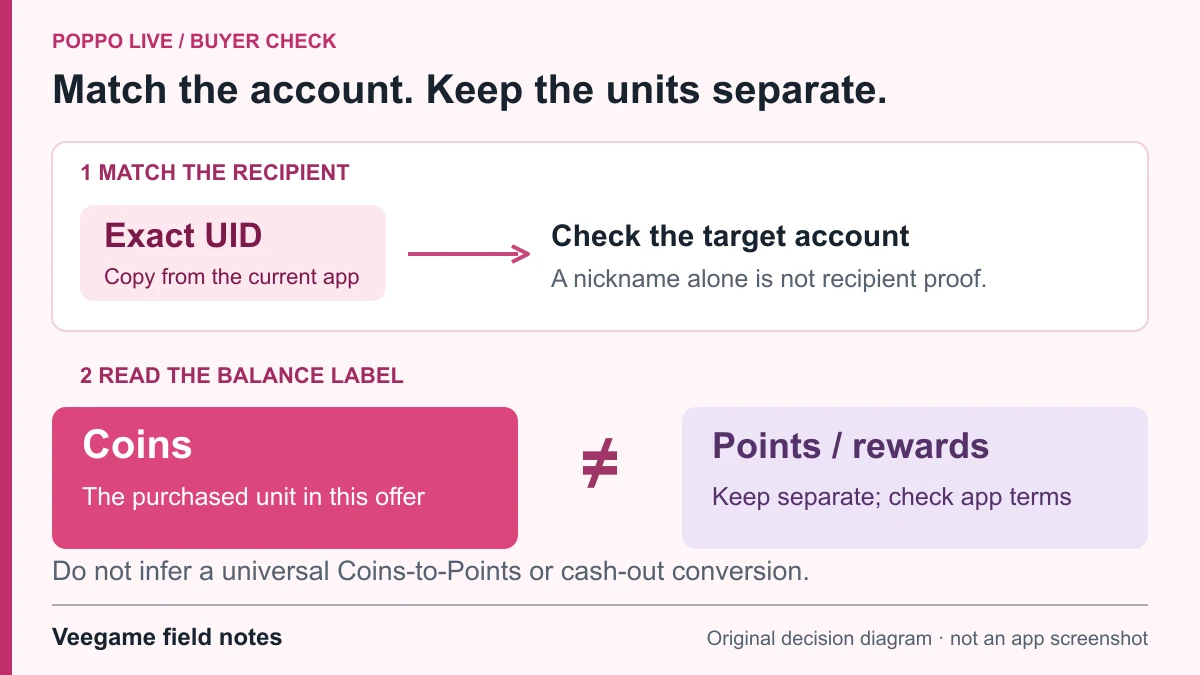
Original Veegame field notes · Primary reference. This is a decision diagram, not an app screenshot.
Sources and scope
Poppo's website and app store listings establish the official Get Coins entry and in-app coin purchases. The step list describes Veegame's User ID order flow; it is not a description of Poppo's own top-up form, and no delivery time, price or promotion is stated.
- Poppo Live official website - Get Coins entry, Help and User Recharge Agreement links
- Poppo official coin top-up page - Poppo Coins: Buy & top up to send gifts
- Poppo Live - Live Stream on the US App Store (seller Vshow PTE. LTD., coin in-app purchases)
- Poppo Live - Live Stream on Google Play
Editorial sourcing and correction-contact information are explained in our editorial approach.