Poppo Live coin packs list: all 18 packs
The table lists the Poppo Live coin packs as they are labelled on our Poppo Live Coins page. Each pack is a direct top-up to the Poppo User ID entered in the order form. The last column is plain arithmetic that compares each pack with the smallest one, which makes it easier to see the gaps between neighbouring sizes.
The list reflects the packs offered on the date shown on this guide. Packs can be added or withdrawn, so the product page is the final word on what is available when you order.
| Pack label | Coins delivered | Size vs 10,000-Coin pack |
|---|---|---|
| 10,000 Coins | 10,000 | 1x |
| 21,000 Coins | 21,000 | 2.1x |
| 50,000 Coins | 50,000 | 5x |
| 100,000 Coins | 100,000 | 10x |
| 150,000 Coins | 150,000 | 15x |
| 210,000 Coins | 210,000 | 21x |
| 270,000 Coins | 270,000 | 27x |
| 300,000 Coins | 300,000 | 30x |
| 420,000 Coins | 420,000 | 42x |
| 460,000 Coins | 460,000 | 46x |
| 490,000 Coins | 490,000 | 49x |
| 560,000 Coins | 560,000 | 56x |
| 700,000 Coins | 700,000 | 70x |
| 920,000 Coins | 920,000 | 92x |
| 1,250,000 Coins | 1,250,000 | 125x |
| 1,780,000 Coins | 1,780,000 | 178x |
| 2,730,000 Coins | 2,730,000 | 273x |
| 3,640,000 Coins | 3,640,000 | 364x |
Why this list has no prices
A fixed price list goes out of date quickly. On Veegame the item amount is the current pack price multiplied by the quantity, converted at the order service's current exchange rate into the currency you select. The payment method may then add its own fee, and checkout shows the item amount, the fee and the total together before you submit the order.
That means two people can see different totals for the same pack on the same day if they pay in different currencies or with different methods. The useful comparison is the final total you would actually pay, not a headline number on a banner.
The same caution applies to official channels. Poppo's US App Store listing shows its own set of in-app coin packages, and its quantities are not the same set as the packs in our table. Compare like with like: the same Coin quantity, one currency and the final amount due.
Section references: Poppo Live - Live Stream on the US App Store (seller Vshow PTE. LTD., coin in-app purchases)
How to choose a Coin pack in three steps
The simplest way to choose is to start from what you plan to do rather than from the pack sizes. Write down the Coins you expect to spend on gifts in the coming session or week, using the gift prices shown in your own app. Then subtract the Coins already in your balance. What remains is your shortfall.
Next, find the smallest pack that covers the shortfall. If no single pack fits well, the form lets you choose a quantity of the same pack, so two 21,000-Coin packs (42,000 Coins) can be an alternative to one 50,000-Coin pack. Check both final totals at checkout before deciding.
Finally, look at the leftover. A larger pack can leave Coins you had not planned to spend. That is not a saving unless you were going to spend them anyway.
- Planned spending (from your app's gift prices) minus current Coin balance = shortfall.
- Smallest single pack, or a quantity of one pack, that covers the shortfall.
- Compare final checkout totals for the options in one currency.
- Prefer the option with less unplanned leftover unless the total is clearly better.
A worked example with round numbers
Suppose you plan to spend 120,000 Coins and already hold 30,000. The shortfall is 90,000 Coins. From the list, a single 100,000-Coin pack covers it with 10,000 left over. Two 50,000-Coin packs cover it too, with the same leftover. A 150,000-Coin pack would leave 60,000 unplanned Coins.
To decide between one 100,000 pack and two 50,000 packs, open checkout for each option in the same currency and payment method, and note the total. Divide each total by the Coins delivered if you want a cost per 10,000 Coins. Use whichever is lower for you; do not assume the bigger pack is always cheaper per Coin.
These numbers are an illustration, not a statement of current gift prices or of what any pack costs today.
When a large pack makes sense - and when it does not
The packs above 1,000,000 Coins exist for people with a large, planned spending total, for example a regular supporter who already knows the gifts they will send over a longer period. For most buyers, a smaller pack placed when it is actually needed is easier to track and leaves less unplanned balance.
A large single order also concentrates risk. If the User ID is wrong, the whole amount goes to the wrong account, and delivered Coins can be difficult to recover. If you are new to a channel, a smaller first order lets you confirm that the ID, the delivery and the balance all match before you commit to a bigger one.
Set your spending limit in real money first, then choose Coins within it. A large Coin number can feel cheaper than the charge it represents.
Checks before you order any pack
The pack size is only one part of a correct order. The other parts are the recipient and the unit. A pack labelled Coins adds Coins to the entered account; it does not add Points, creator rewards or a cash balance, and it does not send a gift to anyone by itself.
Once you have chosen, the step-by-step guide on how to recharge Poppo Live coins covers the rest of the order. For a deeper look at comparing packs by cost, see our final-cost pack comparison.
- The User ID belongs to the account that should receive the Coins.
- The pack label and quantity match the Coins you need.
- The charge currency, payment fee and total are what you expect.
- You have saved the order reference once the order is created.
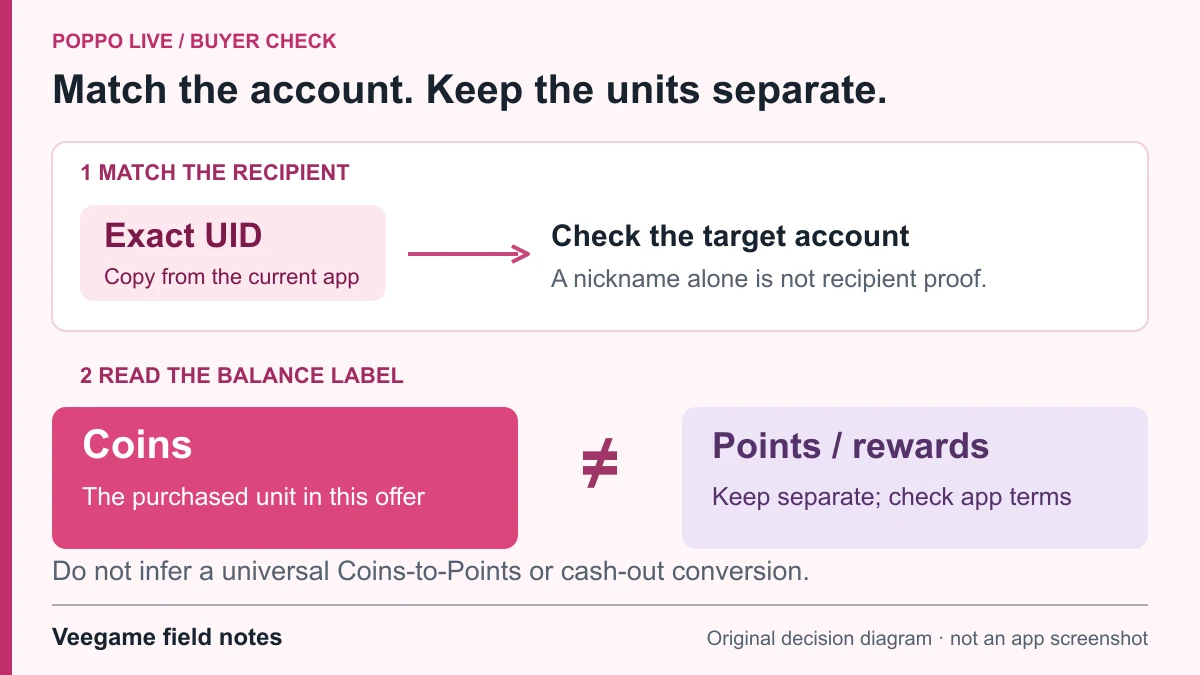
Original Veegame field notes · Primary reference. This is a decision diagram, not an app screenshot.
Sources and scope
Pack labels come from Veegame's current Poppo Live product data. The size column, shortfall method and worked example are our own arithmetic with illustrative numbers; no current price, discount or gift cost is stated. Poppo's listings identify the official coin unit and in-app packages only.
- Poppo Live official website - Get Coins entry, Help and User Recharge Agreement links
- Poppo Live - Live Stream on the US App Store (seller Vshow PTE. LTD., coin in-app purchases)
Editorial sourcing and correction-contact information are explained in our editorial approach.