How to find your Poppo, BIGO, Likee or Mango Live ID - and why it matters
To find your Poppo ID, BIGO ID, Likee ID or Mango Live UID, open the app on the account that should receive the top-up and look at that account's profile page. The ID is the identifier the platform assigns to the account. A display name is different: it can be changed, and other people can use a similar one.
A top-up by ID sends Coins or Diamonds to whichever account matches the identifier entered. If the ID is wrong, the payment can succeed and still credit someone else. Likee's own recharge FAQ, for example, says a mistaken top-up to another person's account cannot be refunded through its channel. The few seconds spent checking the ID are the best protection you have.
| App | What we sell | Field name in our form |
|---|---|---|
| Poppo Live | Coins | User ID |
| BIGO LIVE | Diamonds | BIGO ID |
| Likee | Diamonds | Likee ID |
| Mango Live | Diamonds | UID |
Section references: English FAQ text served by Likee's official recharge page
A method that works in all four apps
App layouts change between versions and regions, so a fixed menu path can be out of date by the time you read it. A more reliable method is to look for the identifier on the account's own profile page, usually near the name and avatar, labelled ID or similar.
Some apps let you tap the ID to copy it. If yours does not, type it carefully and compare it with the screen afterwards. Do not take an ID from a screenshot of a live room or a social media post unless the account owner has confirmed it.
- Open the app signed in to the account that should receive the top-up.
- Go to that account's profile page (in many apps, a tab at the bottom of the screen).
- Find the identifier labelled ID, User ID or UID - not the nickname.
- Copy it exactly, including every digit or character.
- Paste it into the order form and compare it once more before paying.
Poppo Live User ID
Our Poppo Live Coins form asks for the User ID. Poppo's official website covers coin purchases through its Get Coins entry and lists Help and contact routes, but we did not find an official page that sets out where the User ID appears in the app. Open Poppo on the intended account, go to your profile page and look for the ID shown there. The exact label and position may vary by app version.
If you use more than one Poppo account, write down which ID belongs to which login before buying. Our step-by-step guide on how to recharge Poppo Live coins covers the rest of the order.
Section references: Poppo Live official website - Get Coins entry and Help links
BIGO ID
BIGO's Support Center refers to a Me tab in the bottom-right corner of the app, which is where account pages such as Help & Feedback sit. Open Me on the intended account and look for the BIGO ID on the profile. BIGO's own support route also asks for the BIGO ID when you report a recharge problem, which is another reason to keep it noted.
The BIGO ID is not the same as the display name. Our BIGO ID recipient check explains how to tell them apart and confirm the right account before paying.
Section references: BIGO LIVE Support Center - Me tab and Help & Feedback route
Likee ID
Likee's official recharge page asks for the Likee ID of the account to be recharged, asks you to check that account's information, and offers a What is Likee ID? help link. Its FAQ refers to a Me section in the app, where the wallet sits. Open Likee on the intended account, go to Me or your profile and look for the Likee ID shown there.
Copy the Likee ID exactly as it appears, whatever characters it contains, and do not substitute the display name. If the official recharge page or our form shows account details after you enter the ID, compare them with the intended profile before paying.
Section references: English FAQ text served by Likee's official recharge page
Mango Live UID
Our Mango Live form asks for the UID. We did not find an official Mango Live page describing where the UID appears, so we do not give a fixed menu path. Open Mango Live - the app published on the App Store by APPXYZ MOBILE COMPANY LIMITED - on the intended account, go to your profile page and look for the ID shown there.
Make sure the app is Mango Live and not a similarly named app such as Mango Star. An ID from a different app will not identify a Mango Live account.
Section references: Mango Live on the US App Store (APPXYZ MOBILE COMPANY LIMITED) - Diamond in-app purchases and VIP
Final checks before you pay
Once you have the ID, a short final check prevents almost every misdirected top-up. It takes less time than any support request.
Never share a password, one-time code or login link to complete a recharge. An ID top-up does not need them, and our page on how a top-up works lists what the order form does and does not ask for.
- The app name matches the product you are buying.
- The ID came from the intended account's own profile.
- Every character matches between the profile and the form.
- If buying for someone else, they confirmed the ID in writing.
- You noted the current balance so you can compare after delivery.
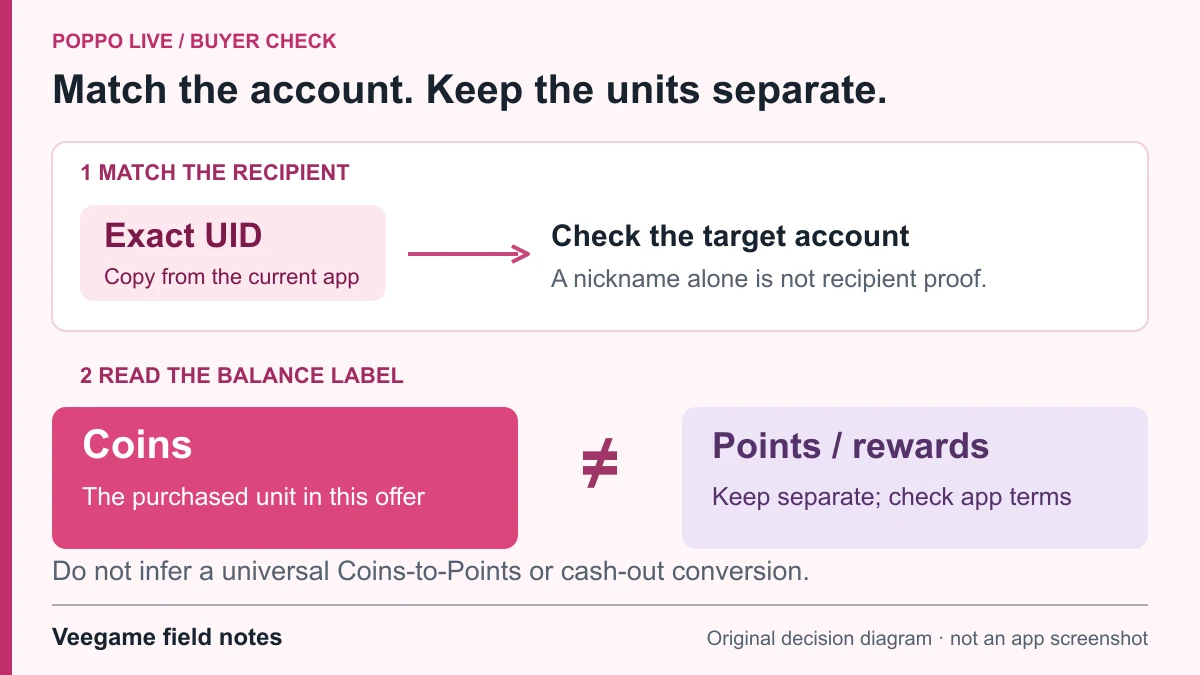
Original Veegame field notes · Primary reference. This is a decision diagram, not an app screenshot.
Sources and scope
BIGO's support page confirms the Me tab location; Likee's recharge page and FAQ confirm the Likee ID requirement, the Me section and its mistaken-recipient statement. No official in-app path for the Poppo User ID or Mango Live UID was found, so those sections describe a general profile-page method only.
- BIGO LIVE Support Center - Me tab and Help & Feedback route
- English FAQ text served by Likee's official recharge page
- Poppo Live official website - Get Coins entry and Help links
- Mango Live on the US App Store (APPXYZ MOBILE COMPANY LIMITED) - Diamond in-app purchases and VIP
Editorial sourcing and correction-contact information are explained in our editorial approach.